A short guide on who you should assign tickets to and when you should assign tickets to somebody.
In Wingtra Support team (a.k.a. the Wizards team), we have our way to handle incoming tickets. Every Monday morning we assign a ticket assignor for each day of the week. The ticket assignor of the day will first check the availability of the support team in CU task description and furthermore, the ticket assignor will be responsible to actively check the new (unassigned) incoming tickets and emails and then decide on what to do with it (either assign to the customer respective CSM, handle it by him/herself or assign it to somebody) for the whole day.
When should I assign the ticket to somebody?
- In case the ticket or email is obviously related to another ticket (which is assigned to somebody else), assign to the respective person.
- If CSM is available, always assign tickets and emails according to the Company ‘Customer success manager’ property.
- In case CS manager is not available, E-mail and Ticket assigner will decide on what to do with it (either handle it by him/herself or assign it to somebody, if you are too occupied).
When should I take the ticket to myself?
- Normally, you would pick the day which you have more time to deal with tickets to be your ticket assignment day. If the assignments are already scheduled please approach Jasna.
- If CSM is not available or has too many tickets to handle, normally you will assign the tickets to yourself, unless you are too occupied. In that case, you would check the CU task description to check the availability of the team as well as support dashboard.
Note: If you are handling the ticket of the customer who is not your assigned account, make sure you always tag their respective CSM so that they are aware of the situation with their assigned accounts.
CSM is receiving a high number of tickets and some of them need to be reassigned. What should you do?
- Try to leave high critical tickets with you, in order to have a better health overview of your assigned account. When reassigning tickets please check CU task first to see the availability of the team and later by reviewing the number of open tickets in the dashboard report.
How to check if some Dev is out of the office?
- If you are assigning tickets on Monday, check Out of Office Bamboo calendar and shortly report in the Wizards Sparring document who from the Devs is out of the office for the current week.
What do I do with shipment / FedEx emails?
- If you see an asterisk (*) in front of the email subject / title, this means that this shipment is the first shipment to this customer, in other words, a brand new WingtraOne user. In this case, please send a Welcome Email to the respective customer (by using existing templates) before you close the email.

- For shipment emails without asterisk:
- Look for the shipment ID in the email.
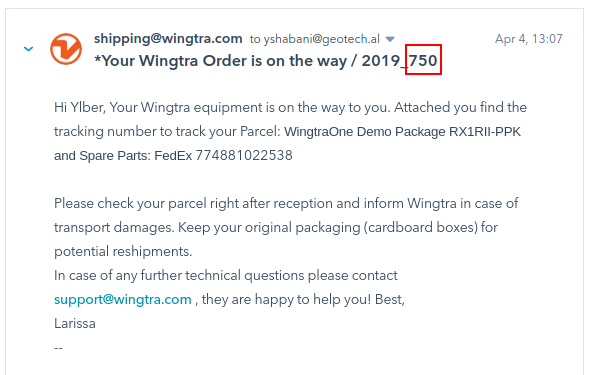
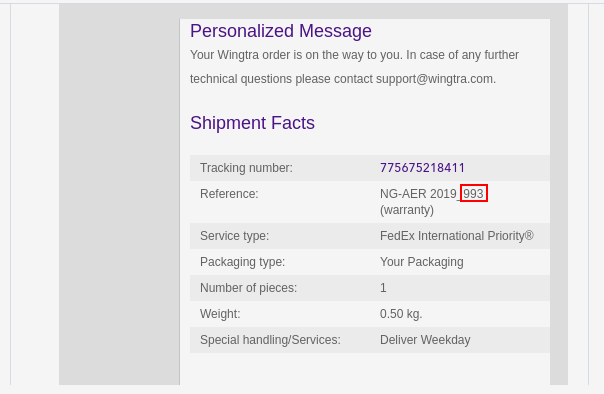
- Go to HS shipment view, and find who created the shipment.

- If it is from one of the support team members, assign the email to them so that they get notified about things which they ordered are going out. They can then close it themselves.
- Otherwise, just close it.
- Look for the shipment ID in the email.
More guidelines on communication
If no logs within 3 days
- If no logs within 3 days (after CSM has asked for the logs) or the first log attempt to upload the logs has failed, CSM should always set up a video call, potentially team viewer and guide the customer on how to upload log files.
- In case the customer is in the field and has a poor internet connection, CSM should ask when they plan to be back and set a reminder to send a follow-up email or schedule a video call if there is already a clear evidence customer has problems uploading the log files.
- In case our customers have a hard time uploading the log files, please ask them whether they are interested in the refresher training and add the ticket in the HS under training pipeline. This general support type of training would be free of charge.
Customer is not responsive
- The general rule is to write two follow up emails and try to call the customer before we can close the ticket (except if the upload of the log files failed --> then we would set up a video call and guide the customer through the process). This, of course, can not apply to all cases as we have different priority cases:
- High priority/ critical tickets - do not close ticket until you have resolved the ticket. You may want to call the customer if one follow up email did not result in a response from the customer. If a customer is not responding always synch with the Sales Manager and together agree on the further steps.
- If no activity for more then 2 days, CSM will receive notification/ reminder to follow up with the customer or analyse the status of the ticket internally.
- Low/ medium priority tickets - if a customer is not responsive but operable (can fly), you may close the ticket after 2 follow up emails + a call. Make sure to inform the customer you will reopen the ticket once you have all the necessary information.
- If no activity for more then 5 days, CSM will receive notification/ reminder to follow up with the customer or analyse the status of the ticket internally.
- High priority/ critical tickets - do not close ticket until you have resolved the ticket. You may want to call the customer if one follow up email did not result in a response from the customer. If a customer is not responding always synch with the Sales Manager and together agree on the further steps.
- Decommissioned units
- Do not communicate the destruction of the autopilot. It is important to inform the customer they should not fly with their old unit and populate the status property of the drone to 'decommissioned'.