The reasons for missing images after a flight can be related to the powering of the camera, the storage or due to the camera configuration. The troubleshooting article Triggering Issues from MicaSense provides an overview of the failure cases caused by the camera. Here below we list the most common issues experienced by WingtraOne operators.
If the below listed known failure cases do not help you to resolve the issue, provide the camera logs and the flight logs to Wingtra support.
Powering related failure cases
- The camera was not connected via the universal payload connector (USB-C)
- When taking a preflight picture of the calibration panel, the button was pressed for more than three seconds; this switches the MicaSense camera off. (WingtraOne does not check the state of its MicaSense payload before or during flight and will not detect that the camera is switched off.)
Storage related failure cases
- The SD card was not inserted correctly or did not have enough space
- The front overlap was set too high with respect to the write speed of the SD card.
- Make sure to use an SD card with the recommended specifications
- Check in WingtraPilot that the front overlap at the set flight altitude does not display a trigger speed warning
Camera configuration related failure
The multispectral cameras from MicaSense trigger images according to the settings configured on the camera prior to a flight. The triggers are not initiated or controlled by the WingtraOne drone.
If you are using terrain following in WingtraPilot and fly below the Target altitude that was specified in the camera configuration interface, you can enter a situation where MicaSense cameras stop capturing images.
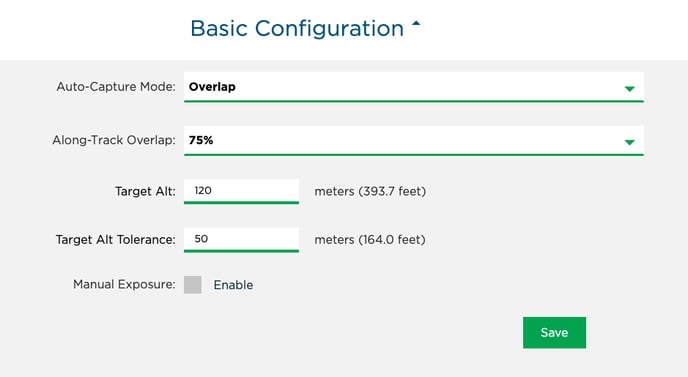 The camera only captures images when flying within the specified tolerance of the target altitude. In the example settings as depicted above, the target altitude is set to 120 meters, and the tolerance is set to 50 meters. So the camera will only trigger from 70 meters above ground level and will stop triggering below this altitude. The ground level that these numbers are based on is the location when the camera is turned on, i.e., the take-off area.
Below, a screenshot that shows a terrain following flight where the image acquisition stops once the drone flies below 70 meters above take-off.
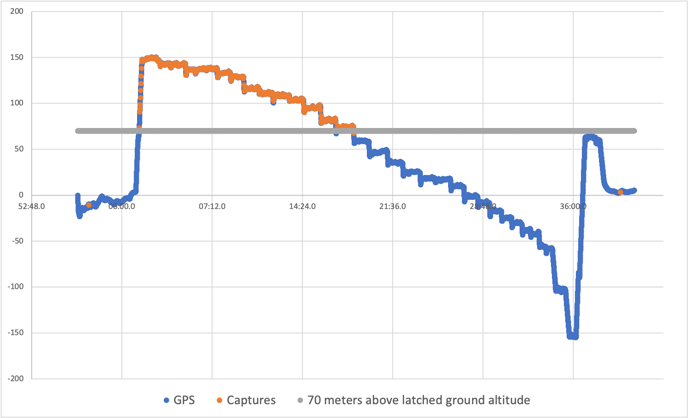
To prevent missing images, increase the "Target Alt Tolerance" value. In the above example it should be set to 300m.