Use the Wingtra Inventory application to access the Wingtra internal drone database and manage your drones.
Benefits of the Wingtra Inventory App:
- Easy tracking of your inventory
- Assign drones to your customer and know their configuration
- Keep status and location of the drone well tracked
Access the Inventory App through the distributor dashboard. You will access this with your personal company passcode. If you do not have a passcode, please contact your Wingtra sales or support manager. Once you accessed the dashboard, you will click on this icon:
Maintaining your inventory
Once logged in the Wingtra Inventory application, you can:
- Find all the data about your drone fleet
- Edit the data
- Export the data
To edit the data, click on the drone name you would like to edit.
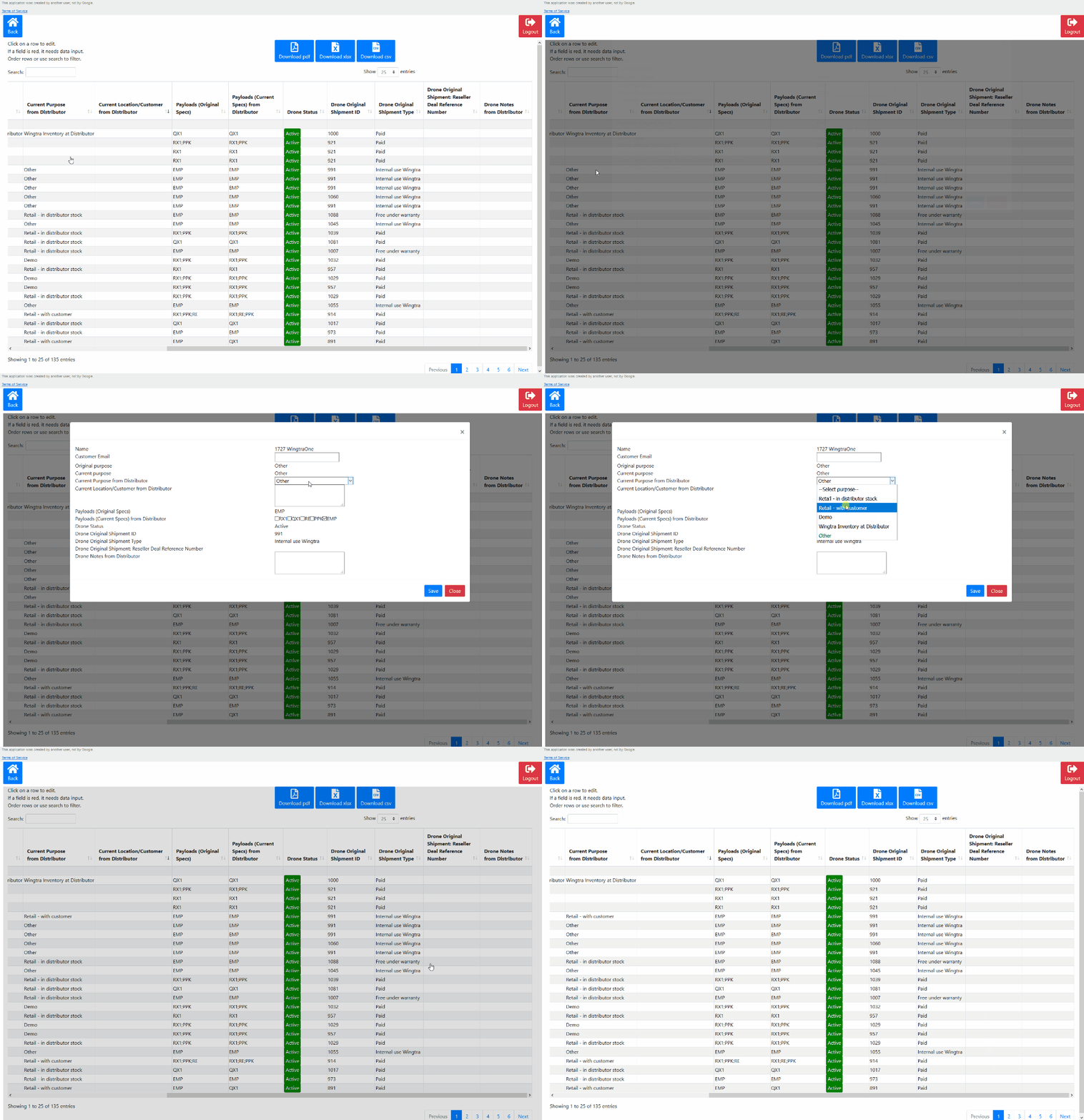
Of particular importance for managing the inventory are:
- Customer email
- Current location
- Is Sold
- Current Payload
See the glossary for more information about the different options.
Scenarios:
- I sold a stock unit
Properties to change or to add, after the stock unit is sold:
-
- Customer email - email from the customer to whom the drone is sold
- Is Sold - change the property to “Yes”
- Current location - change the property to “End User”
- Current Payload - check if there are any changes compared to the original payload.I sold a stock unit
- I have a damaged unit
If your drone is damaged, change the drone status property to Damaged (not usable). After the ticket analysis is done, the customer success manager is going to update the next status of the drone.
- I give a “warranty express unit” to a customer*
A warranty express unit is labeled as “Wingtra Inventory at the distributor”. When handed to a customer as a replacement unit, change the current location of that unit to “End User”. Always get written confirmation by Wingtra to use the Warranty Express Unit as a replacement.
- I have a demo unit
For a demo unit, the property Current Location is going to be set to Distributor, if this unit is damaged or sold, please follow the above examples.
Note that by looking at the properties Drone Use Type and Shipment Type, you will always know the origins for this unit.
*only for selected distributors.
Why keep your inventory up to date?
- Keep track of your inventory and optimize supply and demand planning
- Always know which drones are with your customer and know their configuration
- Keep the status and location of the drone well tracked
Glossary
*= editable
- Name - identification number of a drone.
- *Customer Email: Email address of the customer/owner of the drone.
- Drone Use Type - a property that defines the original use type of a drone.
- Retail unit
- Demo unit
- Rental unit
- Wingtra Inventory at Distributor
- Other
- Shipment Type - a property that defines the original shipment type of a drone.
- Paid
- Replacement (under warranty)
- Replacement (paid)
- Internal use Wingtra
- Wingtra Inventory at Distributor
- Owned By - a property that defines who is the owner of a drone
- Wingtra
- Distributor
- End-User
- *Current Location - a property that defines the current location of a drone
- Wingtra
- Distributor
- End-User
- In Transit
- *Is Sold (to end user) - a property that defines is the drone sold
- Yes
- No
- Original Shipment Product Code - original payload of the drone.
- Automated record
- *Current Payload - a current payload of a drone.
- Sony RX1 R2
- Sony QX1
- Red Edge
- PPK module
- Empty (wing only)
- Needs software update - a property that defines if the drone’s software version is up to date.
- No
- Yes
- Not applicable
- Unknown
- Drone Status - current status of a drone.
- Fit for Use
- Returned to Wingtra
- Damaged (not usable)
- In Repair
- Decommissioned
- Replaced and decommissioned
- Replaced and returned to Wingtra
- Discount on List Price - a property that shows the original discount.
- Paid Standard Discount
- Paid Demo Discount
- Paid Edu Discount
- Paid Other Discount
- Internal use Wingtra
- Wingtra Inventory at Distributor
- Drone Original Shipment ID - the original shipment identification number
- Drone Original Shipment: Reseller Deal Reference Number - the original drone Reseller Deal Reference Number
- *Drone Notes from Distributor - notes about a drone from the distributor
- Free text - any comment that might be important for this drone
- Drone Notes from Wingtra - notes about the drone from Wingtra
Navigation
Alongside all column titles you will find these arrows:
Click on them to sort the information for the numerical value, status or alphabetically.

Download functions allow you to create PDF, .xlsx and .csv files.
To log out of the Wingtra shipment application, click on the logout button.
