Updating Product Catalog (Hubspot and Pandadoc) and the price list
This article explains how you can update the Hubspot catalogue
Hubspot Catalog
- Adding a product to the catalogue in Shipments v2 GSheet
- The "product catalogue" holds all items that can be ordered by Sales / Support via HubSpot, it can be found here
- Basically one has to add a new line (think about the logic of product groups here). COGS will come from Michi / Production, Endcustomer+Distributor pricing has to be defined by Sales. When all info is there --> tab with scripts "Wingtra Shipments" --> "Sync product catalogue with HubSpot"
- You can verify if the sync was done by looking going to the "settings" on "Hubspot" --> "Sales" --> "Product library"
Pandadoc Catalog
- Adding a product to the catalogue in Shipments v2 GSheet
- Download as csv file from the tab "Pricing for Panda .csv export"
- Pandadoc --> Catalog
- Either add a product manually --> "new catalog item"
- Import csv --> 3 dots --> import
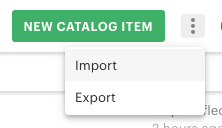
- Check import requirements
- Upload the csv
- Attention! You will receive an email if there are errors (not complying the required format). Only items up the error are uploaded and it only lists 1 error and does not scan for further error (huge downside)
-
Price list update
- Updating the pricelist
- Pandadoc template here (Pricelist). Go to the respective section and add the product there. Note there is a pricing section on top and a description section on the bottom
- HubSpot Knowledge base article "price list" here (edit here). Republish the new price list here.