Learn about the Wingtra Tickets App and how it helps you help customers and keep up-to-date with service interactions.
Benefits of the Wingtra Tickets App:
- Easily see which tickets are up for your reply
- Respond efficiently and keep yourself informed about support progress

Access the Tickets App through the distributor dashboard with your company passcode. If you do not have a passcode, please contact your Wingtra sales or support manager. Once you’ve accessed the dashboard, open the Tickets App by clicking on:

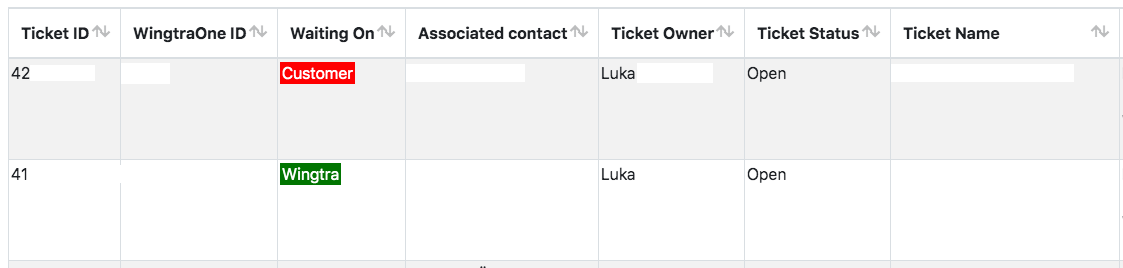
This app gives you immediate access to almost any relevant information you need for any ticket you are overseeing. Inside the Tickets App you can monitor and scroll within to review all tickets and their current state of progress:
Maintain your tickets
Of particular importance is the “Waiting On” column (see red framed section), in which you will find information about who is responsible for the current step of the customer’s care.
If a ticket is “Waiting on” the "Customer", you are required to get back to the support team providing them with the requested information. It is important to always refer to the correct ticket ID.

Glossary
- Ticket ID: unique identifier of every ticket
- WingtraOne ID: ID of the drone in discussion
- Waiting on: Who's responsible for the next step
- Associated contact: contact at distributor
- Ticket owner: member of Wingtra support team
- Ticket status: open or closed
- Ticket name
- Ticket description
- Resolution: final solution for the problem
- Create date
- Close date
Navigation
Sort your entries
Alongside all column titles you will find arrows to sort the information. Click on them to sort the information for the numerical value, status or alphabetically.

Search and filter your entries
The search field on the top left allows you to search and filter for names, status and numbers.

Card view
For viewing the full ticket name and description click on the row and get the card view.

Download
Download functions allow you to create PDF, .xlsx and .csv files.
Log out
To log out of the application, click on the logout button.
