Process on how Support Team can help Sales close deals
Sales engineering and Pre-Sales Support
Sales Engineering is a Pre-Sales Support given by the Customer Support Team in order to help Sales close deals for new customers (not for existing customers). This goes from doing pre-sales tech support, sales calls, technical consulting, and if it is needed, demos and post-processing.
Pre-Sales Support will:
- Assist on technical questions
- Assist in giving support to the potential client/end-user
- Help Sales close the sales cycle sooner
- Answer obstacles on Sales (technical and detailed questions)
- Include or update the Sales Manager on all communications with the customer
- With approval, conduct demos and even do/help on post-processing
Pre-Sales Support will not:
- Promise feature requests or use ‘future’ selling tactics
- Be involved in any sales discussion (prices, discounts, bundles, etc)
- Be a consultant
- Offer onsite assistance
How to create a Pre-Sales Support request
- Sales Rep goes to the created deal for the potential customer
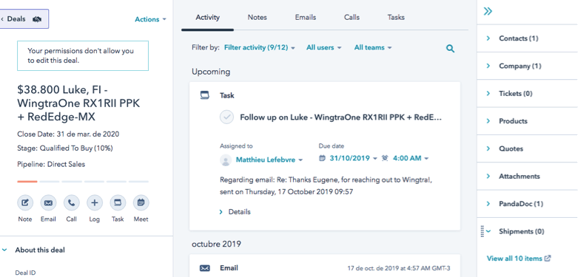
The ticket will not be assigned to the ticket owner unless the ticket creator has created a deal and associated it with the ticket.
- Sales Rep creates a ticket that will be associated with his existing deal.
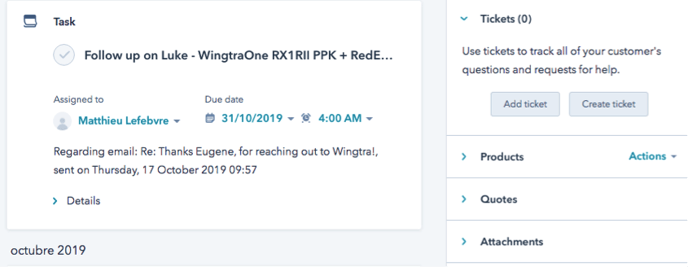
- Sales Rep puts the ticket under “Sales Engineering” Pipeline
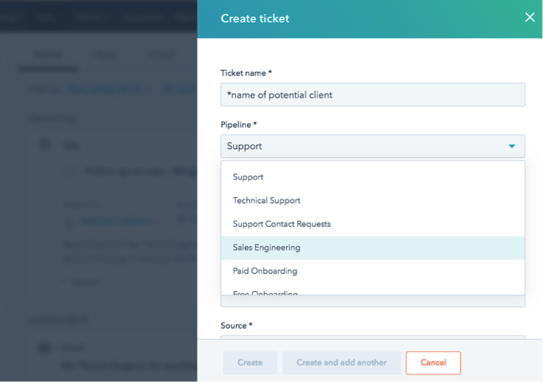
- Sales Rep can choose different Ticket Status. If the Support Team is not aware of this case, the best option would be “New Request”
- It is important that the SE changes the Ticket Status so anyone can check the progress
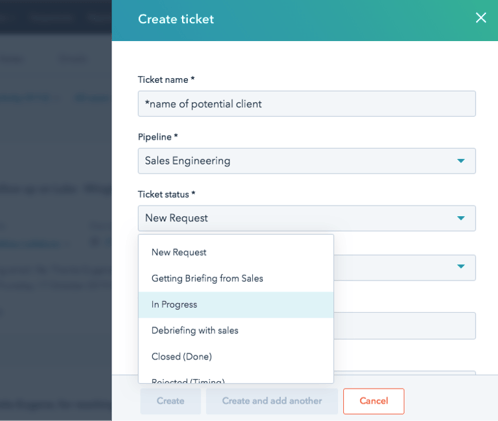
- In the Ticket Description, describe briefly what it is about (all the details will be filled later under Notes)
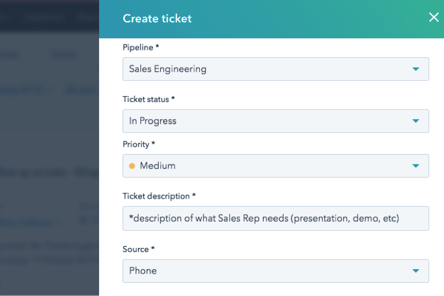
If the ticket was created without the associated deal, Sales Rep will receive a task informing them that the ticket is without an associated deal and that the ticket owner cannot proceed with the ticket. In this situation, the Sales Rep should create and associate a ticket to the deal.
- SE should be the ‘ticket owner’
- It is important that “Sales Engineering” is selected under the Ticket Main Category so the Support Team can see it.
- Under Incident Date, chose the Due Date or the proposed date for the demo (talk, conference, etc)
- Write a Note to the Sales Engineer and use the Snippet Sales Engineering, completing all the fields
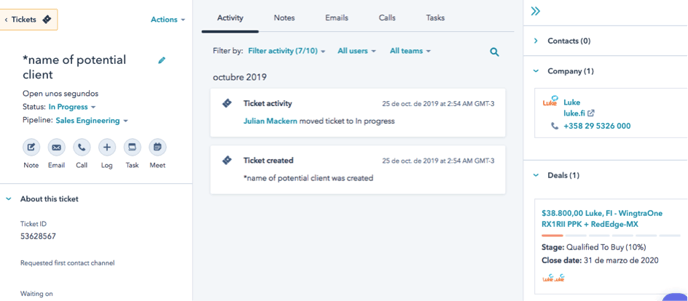
- SE creates a note tagging Jasna and asking for approval. Only after this, SE and Sales Rep can proceed with details.
Closing the ticket
- The ticket owner closes SE tickets.
- To close the ticket there are 4 different options that have to do with the impact it’s had on the potential client. The sales rep will close it according to what he/she feels the impact was.
- Negative impact on the deal
- Unclear or neutral
- Positive impact - time-saving, increased confidence in the deal
- Key involvement, removed an essential roadblock to deal
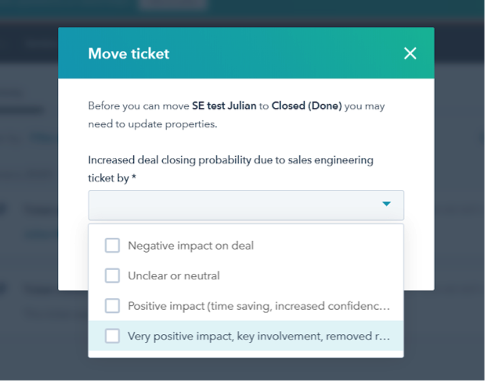
- The ticket owner will have to add the time it took them to work on the presale support request.
Scope and limits for Pre-Sales Support members
- They can dedicate ⅕ of their time to helping the Sales Team.
- They are answering tickets on a daily basis for the Customer Success team so they’re expected to continue answering them.
- If a Pre-Sales Support member is asked to be on a trip for more than one day (Exhibitions, Demos, Presentations), Jasna should be consulted beforehand to check availability. It should be clear why it is important and the level of priority.
- They can deny an invitation if it overlaps with their work and can ask to reschedule the meeting/presentation/call if they need to.
- Sales Engineering Tickets will be created on Hubspot and checked daily by Support Team members. Should there be any questions, a Skype call can help clarify details.
- Sales Engineering Tickets should be less than 2 per week
- The work for Pre-Sales Support members ends when their presentation/meeting/demo/call is over unless they agree to share information with the potential customer (maps, examples, post-processing). In this case, they will cc the Sales Rep in every email they exchange with the potential customer.
- Unless otherwise discussed, the Sales Manager will set the scope of the SE involvement and communicate with both the Support Manager and the SE
- The SE will work under the direction of the Sales Manager throughout the scope of the activity.