This is a guide through our Hubspot processes. It explains the whole process from entering the sales cycle till the deal was closed and the product shipped.
Sales Funnel
All leads/prospects shall be displayed in Hubspot, Wingtra’s CRM system.
Sales leads are generated through inbound (i.e. the forms on our website) or outbound (i.e. by adding a company from prospecting).
All leads should be pushed through the sales cycle as shown below.
Wingtra Sales Funnel:
Read all about the funnel from a marketing perspective here.
Hubspot
Useful resources and functionalities
- Change columns in Filter views
- Editing & previews
- Filters, for team, personal, dynamic and Saved views
- Tasks, task queues to facilitate going through a list
- Sequences
- Notes, @mentions, pinned notes, conversations on Hubspot
- Quotes / document creation
- Workflows for notifications, copying, automation (if then, do that)
- Manage notifications
- Report creation and existing dashboard
- Know the Objects
- Contacts
- Companies
- Deals
- Shipments
- Tickets
- Drone parts
- Owner types
- Created by --> person that created the shipment
- Deal owner --> person that closed the deal
- Shipment owner --> person that is in charge of fulfilling the order
- Contact owner
- Company owner
- Customer success manager
- Channel manager of the assigned reseller
Contact properties
Leads that contact Wingtra via various cahnnels will directly be saved to Hubspot. They can also be added manually.
Contacts are categorized in life cycle stages. Lifecycle stages help you organize your contacts based on the stage (see sales funnel).
Always make sure the properties are set right.
- Minimal property requirement:
- Hubspot Owner
- Country
- Contact Type: Reseller, Direct Sales etc
- Lifecycle stage
- Lead status
- Always have lead status and deal updated!
- Only create a Deal if a real opportunity and be as specific as possible
- Work with Sequences and Templates
- Work with tasks
- Work with filters
Tracking your leads: Filters and Tasks
See all Wingtra contacts in the menu “Contacts”
Hubspot can be very flexible and adapts to your specific information requirement. You can create filters for all kinds of views. Make yourself familiar with the standard filters Wingtra sales reps works with.
Customize your filter views: Read how to create and change filters here.
“Name / Hubspot Owner” gives you an overview of all contacts you are in touch with, be it a direct sale, a partnership or whatever came your way.
“Name / Direct Sales / in progress” will show you those companies you are currently working with. With the help of the additional columns “Last contacted” and or “Last activity” you can easily see who of your companies is desperately waiting for you to get back to them. 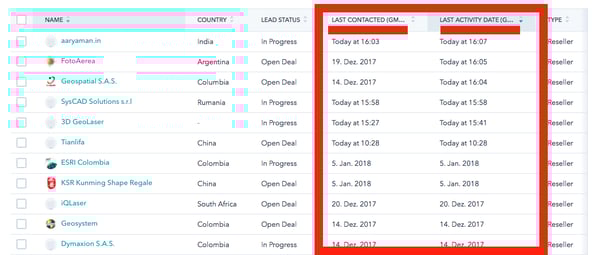
The right filter view is very helpful. Keep in mind, we also work with tasks!
- Check the tasks on a daily basis and keep your leads busy!
- After every email, check that the lead will not disappear from your to do list → create a task
Your tasks live here:
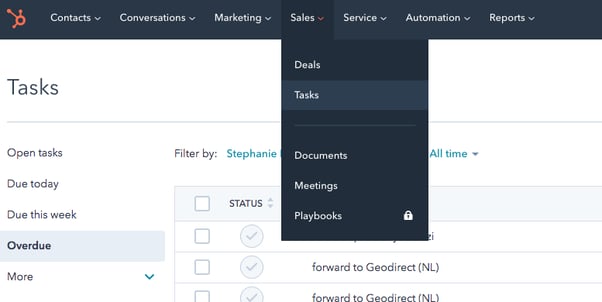
Always create a follow up task when you send an email!
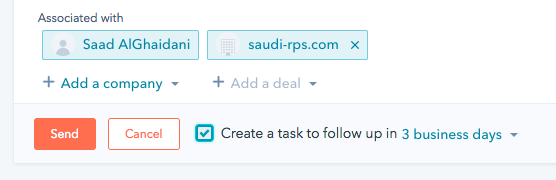
Then you will have your leads in your task list and will not forget to follow up with them.
Communication best practice
- Enrol in Sequences
- Great for non responding leads
- Once a lead responds he will be unenrolled
- Focus on the responding leads !
- Use all the fantastic resources we have on the homepage.
- No email without personalization
- No email without a question
- May I ask what’s your timeline?
- What is your decision process?
- Shall we schedule a call on XX? Would you like a demo?
- Etc.
- Call the contact if reasonable (much better for personal relationship build up)
- Always push lead to the next step
Material to share
Always try to refer to the homepage! There, everything is updated.
Also, use the knowledge base to share articles etc.
Qualify leads
Who is qualified
We are folloing the sales methodology BANT: Budget, Authority, Need, Timeline
Need: There is a problem that could be solved with WingtraOne
- What challenges is your business facing and what problems do you need to solve?
- Belly landings
- Terrestrial work
- Low efficiency of multirotors
- ROI: time and money?
- What is driving your interest in a solution to solve the problems?
- How long have you had this challenge or problem? What made you decide to solve this problem now?
- What objectives are you looking to achieve by solving this pain?
- Technical requirements: Our offering matches the requirements to solve the problem?
- Does our offering match the expectations?
- Are you able to import our solution to your country?
- Discuss attractive countries
- Discuss difficult countries
- Are you looking at or evaluating any other similar solutions to help you solve the problem?
- Where do we stack up in terms of functionality and pricing when compared to these other solutions you’ve been looking at?
- What is your relationship like with your current vendor? (If they have one)
- Do you have an upcoming project where WingtraOne would be ideal?
- So when is the latest when you would want to make a decision? So you wanna have a decision made no later than 2 months. And ideally, when would prefer to get this done?
- So what’s a realistic kind of timeframe that we should be targeting here? When would you like to have the problem solved?
- How important is this to you and where does this stack up in terms of priority and urgency? What are some of the other priorities now?
- Do you have the time and bandwidth to begin implementation now?
- Would you like to hear about how other people I’ve worked with have implemented plans like these? (If they are interested then it indicates that this is important and high on the list of priority and timeline)
- What are your expectations for the investment necessary to purchase the solution?
- Do you have a portion of your budget allocated to this?
- Is your finance team or CFO involved in approving this? (Note: While this can come off as an “Authority” type of qualifying question, it is equally indicative of how the budget approval process works at the company depending on the prospect’s answer)
- What is your typical budget allocation process from when you need to invest in a solution like this that was outside of the original budget?
- When do you plan to ask for budget allocation for this investment?
- Who, in addition to yourself, is involved in making this solution happen at your company?
- How are purchasing decisions made for products like ours and who is involved in looking at this solution?
- Who in addition to yourself is the decision maker with most clout? And next to that person, who is the next person? How important is it that they be on board with the decision?
- What concerns do you think they may have? If they have any potential concerns, how do you think we should handle them?
- Would it make sense for us to schedule a call with them to answer any potential questions they may have?
- Are you comfortable, perhaps prior to our next meeting, if I call (Name of Decision-maker / Influencer) to have a brief conversation? My experience has been that while everyone in the organization is pretty aligned on the needs, typically everyone has got a little bit of a different perspective as to what they are looking for in a solution like this. That way everyone will have input in this. And, by the way, if I get a different perspective from him/her, would you mind if I give you a call? What I hope is that you all have a consensus as to what the solution should look like for our next meeting. Fair enough?
If a lead is a real opportunity (= is qualified) you create a deal.
Deal = Revenue Opportunity = a potential dollar your business may receive for a product or service.
Your deal pipeline consists deal stages (similar to lead status, but for deals instead of leads) that help you determine where you are in the process of closing a revenue opportunity into a client or customer.
The deal stages give an insight on sanity and expectations of deal in discussion. Learn the unique meaning of our deal stages here
Closing deals
Offering
All in the product catalogue in Hubspot
Or in the product configurator on configurator.wingtra.com
Check out Wingtra’s Sales policies
Quotes
Every offer requires a quote which we can create directly within Hubspot. Read all about quote in the links below:
Deal won
YAYYYY!!!!!!! Awesome.

Invoice
We use Pandadoc to send invoices.
After your purchase agreement was signed you have to issue an invoice.
Before creating the invoice make sure all products and payment terms are reflected in Hubspot correctly.
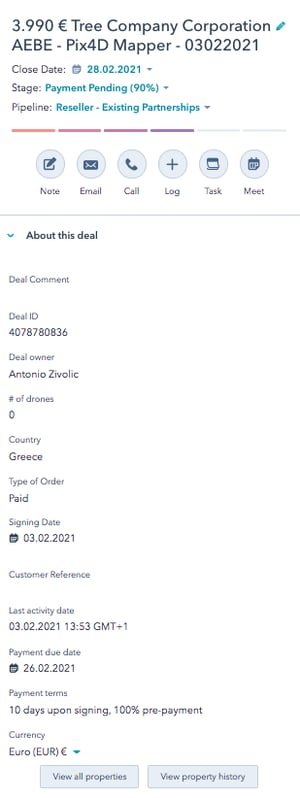
Required fields:
- Amount
- Close date
- Deal owner
- # of drones
- Country
- Type of order
- Signing date
- Payment due date
- Payment terms
- Currency
Split payments: If you have a deal with a split payment request: read how we handle split payments
Once all deal properties and the products have been double checked you can create an invoice through Pandadoc.
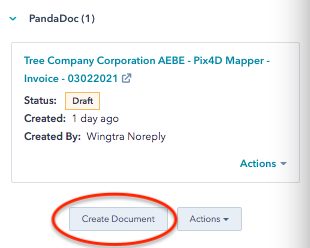
Pandadoc automatically fills all tokens from the deal. Check all tokens that have not been filled and fill them.
Shipment
As soon as you have sold something you have to create a shipment in the very same deal.
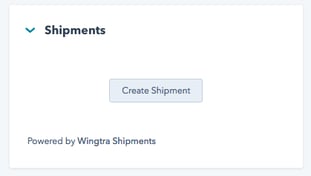
Existing shipments are displayed in the corresponding deal:
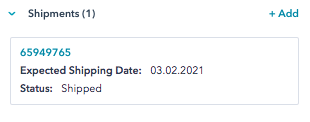
It shows the status and expected shipping date.