This article describes the parameters that affect the telemetry and remote control signals and explains how to prevent WingtraOne from returning home after losing both connections.
The environment in which the drone is operating affects the strength of the telemetry and RC signal.
In urban areas, the connection between the drone and the telemetry/RC is expected to be lost faster due to obstructions, like buildings and other structures, or due to interferences with the mobile network signals.
In rural areas, the connection can be interrupted due to natural obstructions such as trees, hills, etc. For example, when you are standing in a valley and your mapping area is at a higher altitude, the telemetry signal is weakening earlier due to the obstruction of the line of sight between the WingtraOne and the operator.
Another parameter that affects the range of the telemetry is the placement of the antenna and the position of the antenna in relation to the WingtraOne. For example, when the WingtraOne is flying towards the antenna, the signal is stronger. In the following article, you can find best practices for maintaining the connection for longer while flying.
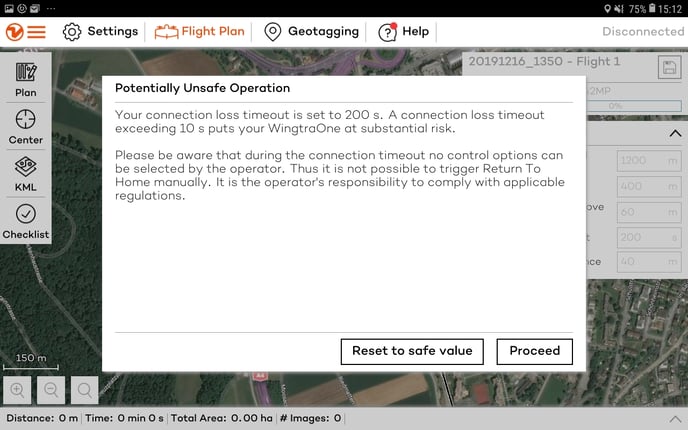
In case you cannot avoid one of the above cases or for flying beyond visual line of sight, 10 seconds after both connections are lost, RTH will be triggered. The time interval in which RTH will be triggered is defined by the Connection loss timeout parameter, in the Safety parameters section.
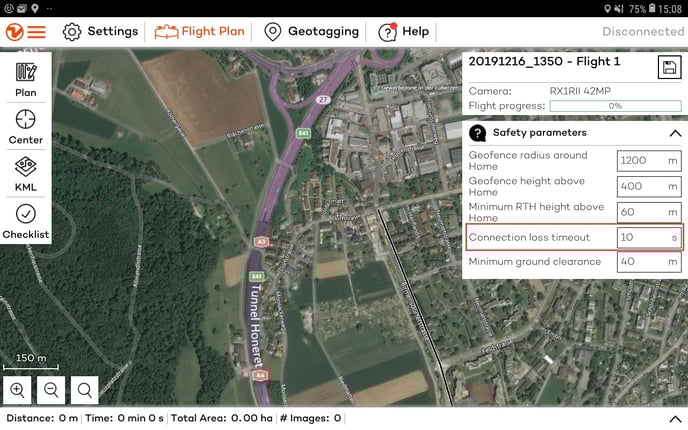
Increasing this parameter will increase the time interval after which RTH will be triggered. You can set this value up to 3600 seconds. This parameter is reset on every power-up and needs to be set manually before every flight
Note that when both connections are lost, there is no way to interact with the WingtraOne. Thus, additional attention should be paid during flight planning.