This article clarifies the causes and solutions of the most frequent errors and warnings that a user might encounter when geotagging in WingtraHub.
Using WingtraHub, the images can be geotagged using a PPK or non-PPK workflow. More information about each procedure can be found here: PPK Geotagging, Non-PPK Geotagging.
This article is focused on errors and warnings that could appear during PPK geotagging. The errors and warnings are visible in WingtraHub after processing and in the output report.
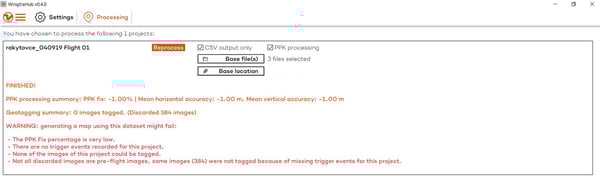
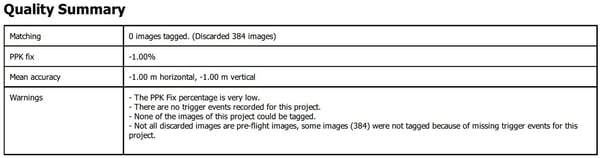
List of Errors and Warnings
- Error: Processing failed, cannot find the base station file(s)
- Error: PPK processing failed, error converting base RINEX file
- Error: PPK processing failed, no valid solution found
- Error: PPK processing failed, file not accessible
- Error: Processing failed, there is no time overlap between base file data and WingtraOne SBF file data
- Warning: Time overlap between base file data and WingtraOne SBF file data is not complete
- Warning: Large time overlap between different base files
- Warning: Base file has an irregular time interval. There might be gaps, or the different base files have different update intervals
- Warning: Base antenna type could not be auto-detected. If not done yet, please account for your antenna phase center offset manually, using the antenna offset field in the base location editor and reprocess
- Warning: Base file update interval is larger than 25s
- Warning: The PPK fix percentage is very low
- Warning: Generating a map using this dataset might fail
Error: PPK not ready (error opening file)
This error will appear if the license file path (C:/Users/<username>/.septentrio/) contains special characters.

In order to avoid this error always use standard characters for the folder where the .septentrio subfolder is located.
Error: Processing failed, cannot find the base station file(s)
This error appears if the processing is started without importing base file(s). Please check that you have imported the base file(s) then start processing again. If the base station files are not available, you can always geotag images using the non-PPK workflow. In order to do so, uncheck the PPK processing option and start the processing.
Error: PPK processing failed, error converting base RINEX file
The first step of PPK processing in WingtraHub, is the conversion of the selected RINEX files to a .sbf file. In some cases, WingtraHub is unable to transform the input RINEX files to the .sbf file due to the incompatible structure of the RINEX files, which can result in an ERROR.
A solution to this issue is to check the structure of the RINEX files, remove observations containing faulty timestamps, remove additional/unexpected lines and check the date. On the images below you can check out examples:
- Correct timestamp vs faulty timestamp
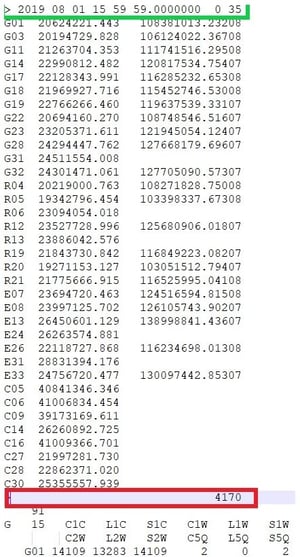
- Additional/unexpected lines (comments)
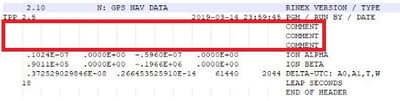
- Faulty date format vs. correct date format


For now, WingtraHub only uses GPS and GLONASS constellations. Including other constellations (Galileo and BeiDou) into observations can lead to problems. In order to avoid errors caused due to constellation restrictions do one of the following:
- Prior to the start of the observation, select only GPS and GLONASS constellations
- Import only the observation base file (.o) into WintraHub
- When generating the RINEX file only include GPS and GLONASS. Specific constellations can be removed using any tool. One example is the open source program package RTKLIB (to download and read the tutorial please check this link). Another option involves downgrading RINEX to the 2.11 version, which supports only GPS and GLONASS
Error: PPK processing failed, no valid solution found
This error is caused due to the bad quality of the RINEX file of the base station. The potential causes of this error are:
- The low carrier-to-noise ratio of the signal
- Multipath
- Bad installation of the base receiver and antenna setup
- Interference
- Irregular timestamps (see example below)
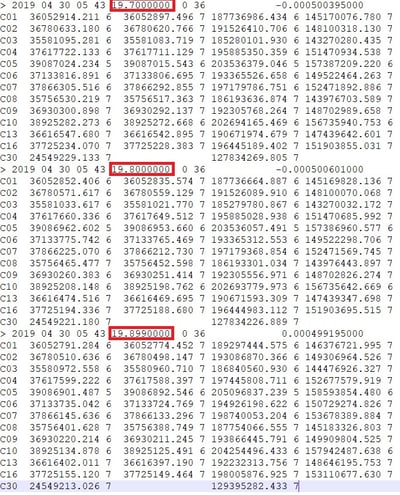
If irregular timestamps appear in observation after the flight is done, delete them and reprocess the project. But if too many timeframes of the flight are affected, the only solution is to use a RINEX file from another base station.
Error: PPK processing failed, file not accessible
If this error appears, please check that all files are there and that they are not accidentally moved or deleted after the processing has started. Also please check that the files are not on a read-protected SD card and the location they are stored is not write-protected.
Error: Processing failed, there is no time overlap between base file data and WingtraOne SBF file data
In order to successfully calculate precise geotags, both GNSS observations from WingtraOne and observations from the base station should fit within the same time frame.
If this error appears, please check whether the selected RINEX file covers the entire time period of the mission. You will find the UTC date and time of take-off for each flight in the WingtraHub projects overview. Check if your RINEX files cover the entire flight time from take-off to landing. The time of the first and last observation can be found in the header of the RINEX file.
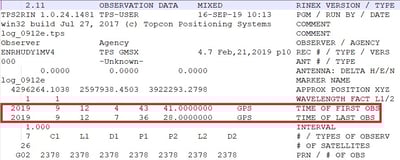
The time overlap warning can appear if the RINEX includes kinematic data. You can remove the data by opening the .o file in a text editor and manually deleting the kinematic data section after the header (selected text in screenshot below).
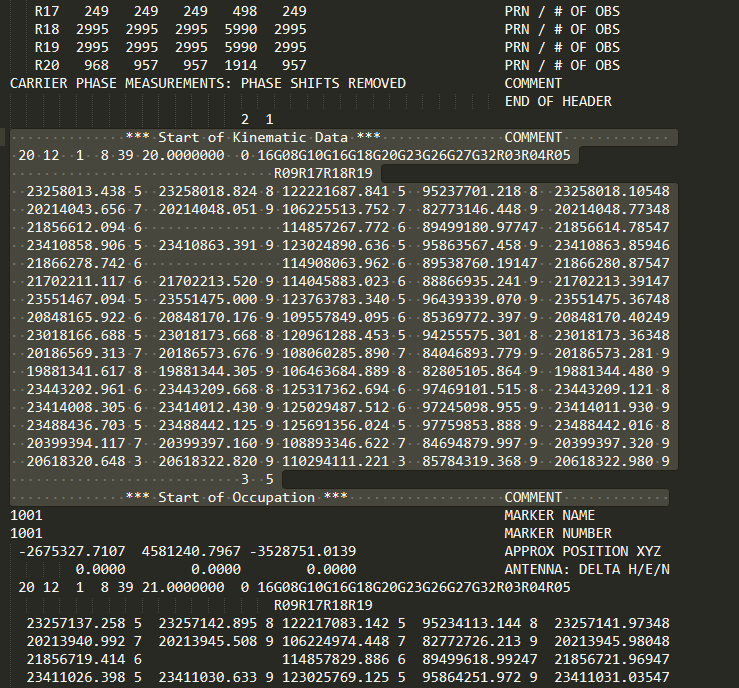
If the file was generated using the software Convert to RINEX from Trimble, the kinematic section can also be excluded by selecting the option "Suppress kinematic records" as depicted below.

Warning: Time overlap between base file data and WingtraOne SBF file data is not complete
This warning has a similar cause as the error mentioned earlier. The only difference is, in the case of the warning, there is a partial overlap between .sbf and RINEX file. Make sure you have started base station observation 5-10 minutes before and after take-off in order to be sure the flight observations fit fully within the time frame of the base. If the majority of flight time is covered with the correction data from the RINEX, the project can be processed successfully. When the accuracy of each image (output .csv) is included in the post-processing software, the images with bad geotagging accuracy will be weighted less during the calibration.
Warning: Large time overlap between different base files
This warning is caused due to the presence of multiple RINEX files that have overlapping observations or the same timestamps. Please check the timeframes of each RINEX file and make sure they are not overlapping. It can also appear if one RINEX file has duplicate timestamps.
Warning: Base file has an irregular time interval. There might be gaps, or the different base files have different update intervals
If you have imported two or more RINEX files with different intervals of registration, or if there is a gap in a single RINEX file, this warning will appear. In order to avoid it, make sure all imported RINEX files have the same interval of registration, and there are no gaps within observations.
If RINEX files have no regular time intervals, please check the accuracy of the geotags. If the accuracy is good, the project can be processed successfully.
Warning: Base antenna type could not be auto-detected. If not done yet, please account for your antenna phase center offset manually, using the antenna offset field in the base location editor and reprocess
If the antenna offset is not automatically detected, the offset needs to be entered manually. For more information read the troubleshooting article.
Warning: Base file update interval is larger than 25s
An update interval larger than 25s could cause decreasing geotagging accuracy. Please use a logging interval of 15s or faster (1s is recommended for the highest accuracy).
Warning: The PPK fix percentage is very low
A low PPK fix percentage has many different causes, yet is most often generated because the base station was not correctly configured. In order to detect the causes of this warning and solve the issue, please check our troubleshooting article.
Warning: Generating a map using this dataset might fail
This warning appears because data was not available or not properly organized.
Please check our Knowledge Base article, to review the causes of such issues and what to do in order to solve them.