- Help Center
- Troubleshooting
- PPK Module
How to check the connectivity between the camera hotshoe and the PPK module
Loose connectivity between the camera hotshoe and the PPK could cause missing registration of triggers, which can lead to errors and warnings during PPK geotagging in WingtraHub.
Check the cable and the hotshoe connector. Make sure the connector is fully plugged in.
.gif?width=400&name=ezgif_com-gif-maker%20(1).gif)
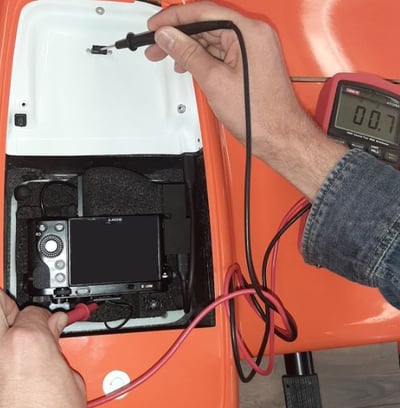
In case the issue can not be resolved, test the connectivity between the hotshoe and the PPK antenna as following:
- Make sure your WingtraOne is turned off
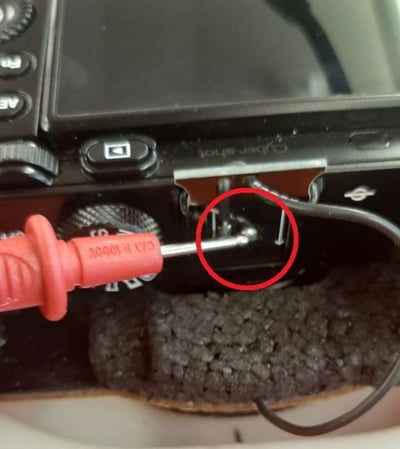
- Put one probe of the Multimeter on the metal ball on the front end of the hotshoe
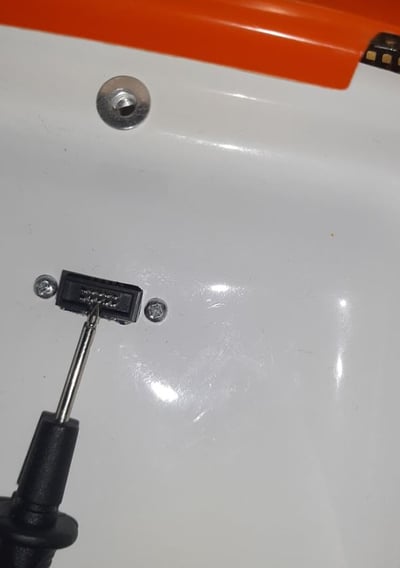
- Put the other probe on the middle front pin of the PPK port
- If the Multimeter shows a value, the connection between the camera hotshoe and the correct pin on the PPK connector is fine. Otherwise, depending on the faulty part, replacement of the camera mount, PPK module, or wing will be required.