Here you'll find nine video introductions to inbox, tickets, pipelines, notifications and the Knowledge Base and five complete walk-through videos for support agents and engineers working on support tickets.
The nine overview videos take a total of 30 minutes to watch. They give you a rough overview from a Wingtra perspective. If you have specific how-to questions, Google them + "hubspot." That always brings excellent results.
At the end of this article, you will find further tutorials in five videos, which walk through a customer crash ticket (four videos from a "customer success" perspective, one video from a"development" perspective).
Nine overview videos
Work with the conversation inbox
This video covers:
- Communication vs. tickets
- Assignments
- Filters
- Create and preview tickets
- Preview / updating tickets from inbox
- Incoming log notifications
- Use documents and knowledge base articles
- Use snippets and templates
Creating tickets
The video covers creating tickets from
- Inbox
- Other records
- KB
- Ticket view
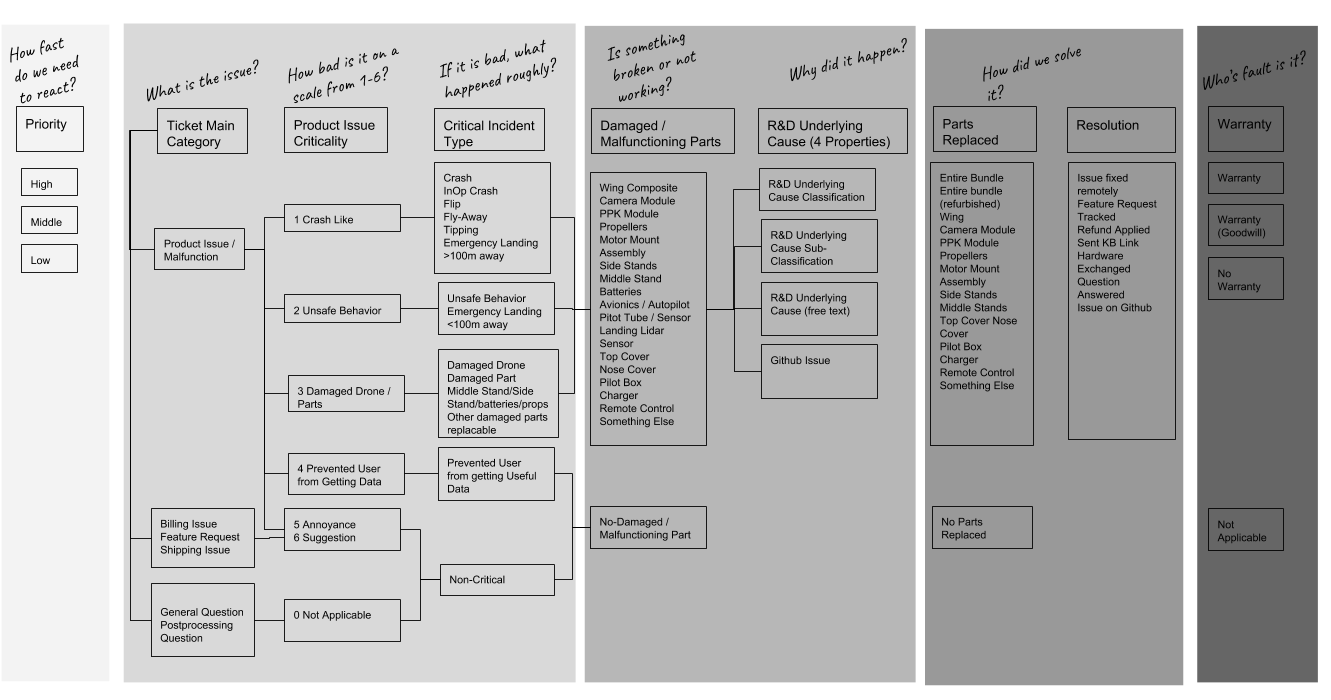
The latest changes about ticket classification and pipelines can be found in the KB article: How to classify support tickets
Ticket classification and ticket variables
In Hubspot, each variable shows you a short description at mouse over. Click on the image to enlarge.
Ticket pipelines
This video covers
- Support pipeline
- Technical support pipeline for involvement of engineers
- Using filters
- Exporting tickets
Create shipments and returns
1. Create a deal associated with your ticket.
2. After you created a deal, add a shipment to it.
Working with tickets
This video covers
- Left-hand sidebar
- Property history
- Hide empty properties
- Right-hand sidebar
- Context structure and preview
- Post replies and @mentions
- Filter timelines
- Find attachments, flight logs
- Use snippets and Knowledge Base articles
Notifications
Notifications can come from
- Workflows
- Hubspot profile and preferences
- Slack
Knowledge Base (KB)
The video covers
- Structure of the Knowledge Base (Distributor Portal, Wingtra internal, academy, manual)
- Edit the Knowledge Base
- Set view permissions of articles
- Give access to contacts to restricted articles
Dashboard and analytics
Walk-through videos for support / engineering support
Technical support ticket tutorial: part 1
Technical support ticket tutorial: part 2: flight log upload
Technical support ticket tutorial: part 3
Technical support ticket tutorial: part 4
Technical support ticket tutorial: Dev part