This article shows how to replace the telemetry module inside WingtraOne step-by-step
Detailed step-by-step instructions can be found it the following video
Required tools:
- Torx T10
- Long-nosed pliers
- Hot air gun (hairdryer)
- Remove the 2x M3 screw on the sides
- Pull the cover forward a few cms
- Push the cover one side (squeeze it a bit)
- Remove the cover
- Careful - Do NOT rip off any cables
2.) Take a hair-dryer and heat up the area of the telemetry from inside. Make sure not to heat too much. 10-15 seconds should be enough.
- Take some long-nosed pliers and remove the hot-melt adhesive
- Repeat the hair-dryer step and the “peeling away “ step until the telemetry is loose. (This is not easy. Stay patient and try to not damage the green holder)
3.) Unplug the cable going to the telemetry module (Black 6 pin connector with 1 pin on top)
4.) Remove the telemetry module by pulling it to the front of the drone.
- While doing so, try to hold the circuit board below the telemetry in place
- If it does not work, use a hairdryer. Do not set it to maximum heat
- This will make the adhesive turn soft/chewy
5.) Insert the new telemetry as shown in the following picture.
- Rotate the module so that the angled antenna passes by the USB-connectors
- After passing the USB-connectors, rotate the telemetry so that the label is horizontal and the angled antenna is pointing downwards.
- Move the module in a way that the straight antenna touches the holder (straight antenna is right of the holder in flying direction)
- Push the telemetry backward until you feel a “snap”
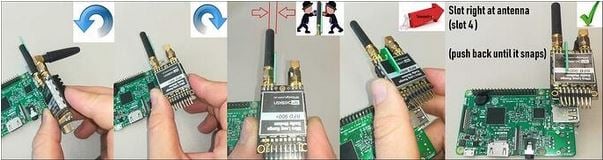
6.) Connect the cable like shown in the following picture:
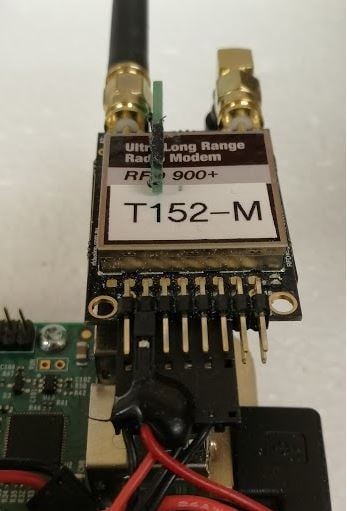
7.) If you felt the “snap/click “ when pushing the telemetry backward, there is no need to secure the telemetry. It will stay in its place
8.) Close the electronics cover
9.) Insert the 2 screws. The ground and plane modules are already paired so you are ready to fly now after the replacement