- Help Center
- Wingtra Internal
- Customer Success
How to escalate Bentley Context Capture issues
In case a customer has questions about processing in Bentley Context Capture, try to help them. Ask for the dataset and try to process it. If sharing the dataset is difficult or not possible and we cannot offer any support to the customer, the issue should be escalated to Bentley support.
There are 2 options to escalate the issue:
- customer opens directly a support request over Bentley Connect
- CSM open the support request on behalf of the customer
How to open a support request?
1. Create a Bentley account
2. Ask Julian S. to add you under the Wingtra organization
3. Log in Connect Bentley
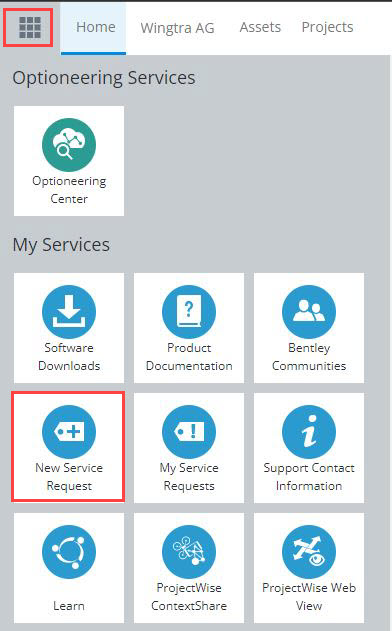
4. Click on the top left icon and scroll down till you reach the section My Services. Select New Service Request to open a new request.
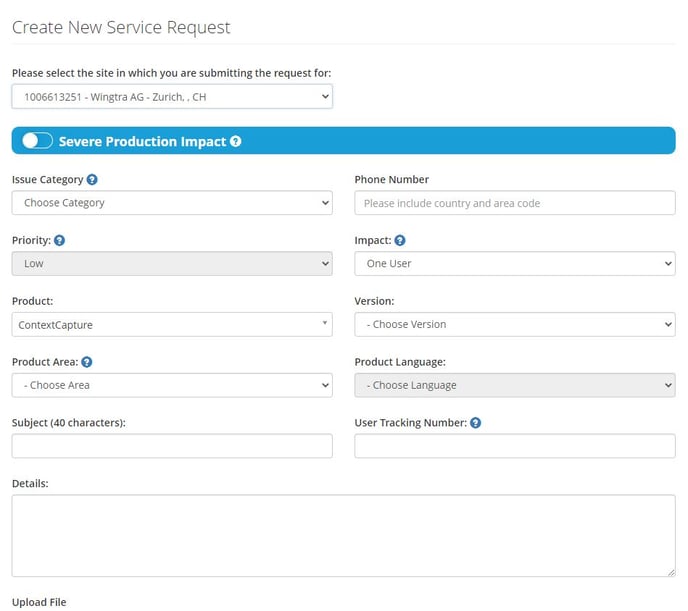
5. Select the right category based on the type of question you have.

6. Fill in and submit the Support form. Make sure that you select the Wingtra AG site for your request.
Under My Service Requests you can find all the support requests that have been opened under Wingtra AG.
For high priority support cases, if there is no reply within 1 working day, contact directly kev.mcdonald@bentley.com and inform him about the urgent case.
To get help to close a deal, connect the customer directly to kev.mcdonald@bentley.com.