The objective of a Post-mortem is to have a written record of an incident, its impact, the actions taken to improve the process or resolve it, the root cause(s), and the follow up actions to prevent the incident from reoccurring.
Postmortem reports should be created for each CES below 6 (a process that caused customer’s dissatisfaction). The task will be created in Clickup and assigned to the ticket owner.
After receiving the task, please do the following:
- Fill task’s metadata(reseller/end-user, category, link the ticket, etc)
- Analyze the ticket
- Do the report using a predefined ClickUp template (Use predefined labels in the description field)
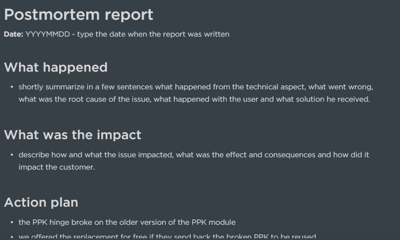
- Define the action items and set action point needed status to Yes,
- If the issue is related to the support team and its workflows, propose and execute the solution (e.g. improve/update the existing instructions, write/update KB article, define a strategy on how to tackle specific incidents, write a template, etc) and share it with team lead during 1on1 weekly meeting. If needed, create a ClickUp task so the proposed solution can be tracked.
- If the issue is related to the other teams (P&D, HW, or SW devs, fulfillment, sales) reach the most appropriate person (organize the meeting, call, or just use Skype) and let them know about the issue. Discuss if there is a way to bring improvement. Ask if they are aware of the issue and if there is a related ClickUp task.
- If the answer is yes, check what is the status of the task and link it to the report (Related ClickUp task field).
- If they are not aware of the issue, ask if something can be done to bring improvements and suggest creating the new ClickUp task to have a clear overview of responsibilities and tag the most appropriate person.
- In case we got CES due to missing feature, submit the request and put the comment (visible only to admins), so admins and a responsible person knows about that fact
- In case you don’t have a clear understanding of why you got low CES, or during the meeting with other teams the conclusion is nothing can be done to improve, do the report, summarize the case, set action point needed status to No and set In Review status
- Present to the team leader in 1on1 sparrings
- Once you are done, change the status to In Review
- Admin will review a report, and if all is done, close it
Postmortem reports can also be done in the following cases:
- Ticket opened more than 14 days, especially for the ticket that doesn’t have the label or the ticket owner realized the ticket could be handled better
- For every existing procedure or process which can be improved or went wrong
In these two cases, the task will not be created by admin and assigned to the ticket owner - each Support team member should proactively create the task and assigned it to himself. How to do it check on the video below.
Once the solution is found, make sure all involved people know about your learnings; if appropriate share your insights in the weekly team meetings or consider writing or updating the existing article. Everybody will be grateful if they can avoid a mistake you already did for them. Make sure the same mistake cannot happen again.
Every few weeks dedicated PostMortem meetings will be organized on Wednesday unless there is a dedicated meeting already booked. The purpose of the meetings will be to inform the whole Support team about the issues, solutions, and improvements. In that way, we will try to avoid repeating mistakes and improve our workflows.