Introduction
WingtraOne is equipped with two onboard computers.
1. The core computation that allows it to fly (reading sensor signals, estimation, control, communication with the ground station and RC, etc.) happens on a Pixracer board. You can also call this the "autopilot," and the software running on it is built upon the open source PX4 flight stack.
We profit heavily from their work and try to contribute back as much as possible. Wingtra's "pacflyer_PX4" Git repository contains a modified version of the PX4 firmware within the PX4/ folder. This is the codebase that runs on all our robots.
2. The communication of WingtraOne with the cameras and PPK board is handled by the on board computer (OBC). We use a Raspberry Pi 3 board.
If we download logs from WingtraOne, we receive log files from both computers. For flight issues, we look directly into the log files from the Pixracer. And if we need to assess camera or PPK issues, we look into the OBC log files first.
Access flight logs from WingtraOne
To access flight logs, you have to power WingtraOne, insert the WingtraOne SD card into the "WingtraOne SD card adapter" and the adapter into the drone, and start to transfer the logs to the SD card from within WingtraPilot. Check out access flight logs for more information.
The process will create a folder /WingtraFlightLogs on the SD card, which contains different .tar files.
- The DATETIME-FIRSTFLIGHT__DATETIME-LASTFLIGHT__Xflights.tar file contains the log files of the latest X flight sessions
- The (optional) recovered_data.tar file contains recovered flight imagery or PPK files in case there was a data transfer issue on the last flight
Get logs from customer and organize it on google drive
The preferred way to get logs from the customer is via our flight log uploader. Check out video 2 of the sample customer crash tutorial to see how to organize the data on Google drive.
In order to make a thorough analysis when there's a problem with PPK, we can ask the costumer to upload the pictures. For this, we'll ask him/her to resize images so the upload can be done faster. Check this article and feel free to send it as .pdf to the costumer.
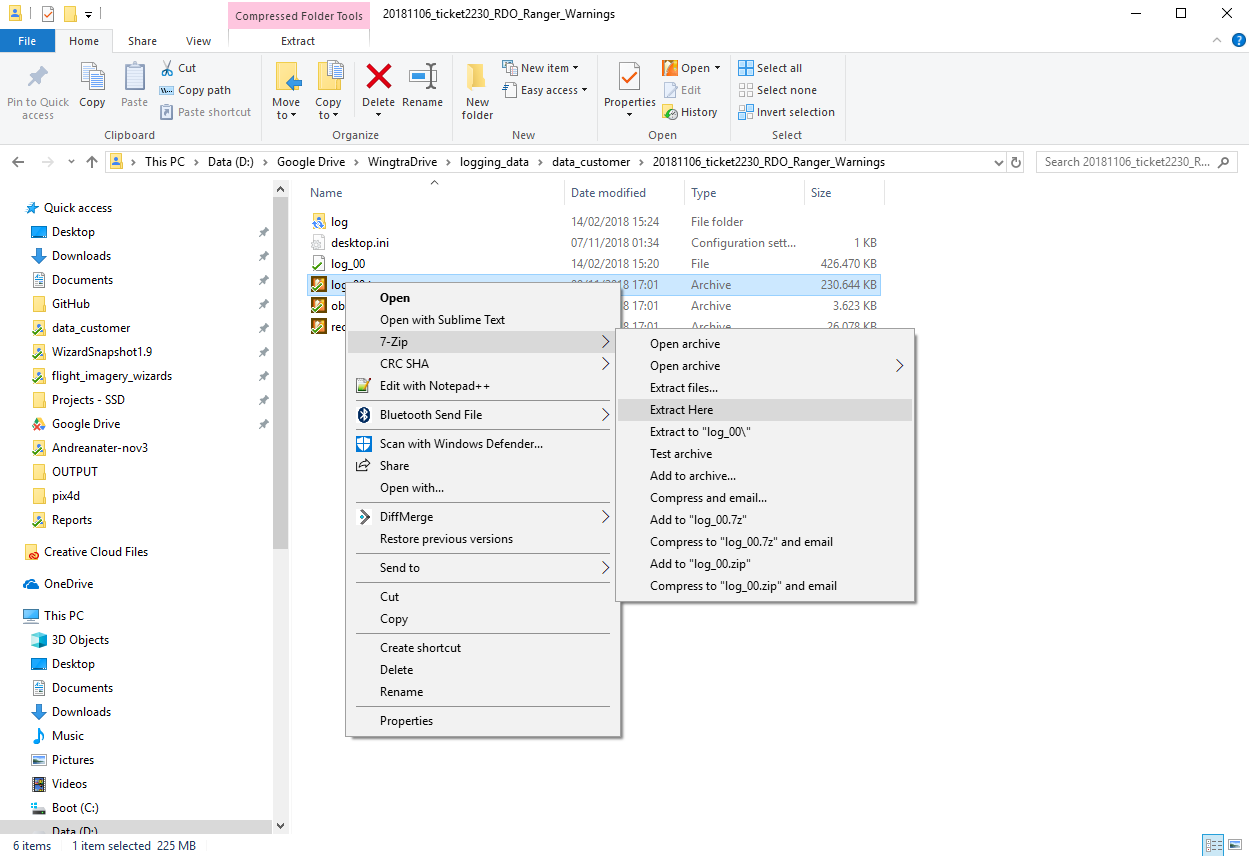
To unzip the .tar files, you may use The Unarchiver on Mac OS or 7-Zip on Windows OS. On Windows, strangely, you are required to unzip every file twice! To unzip, right click on every .tar file individually, choose "7-Zip --> Extract here", and repeat the same steps on the created file (see screenshot below):
Analyzing flight logs from Pixracer (flight issues)
Since WingtraPilot release 1.9.4, the logs can be analyzed with one of two Wingtra tools, see below. For older logs, please check out the old process as described in our WingtraBook.
Please schedule a session with somebody from the team to get started with log analysis.
High-level estimation and control logic of the WingtraOne drone:
.jpeg?width=688&name=High%20Level%20Control%20Structure%20(1).jpeg)
Analyzing flight logs from OBC (camera / PPK Issues)
Soon this should be included into the WingtraExplorer tool. For now, please analyze OBC logs always on the desktop computer in the Zurich office (you can use team viewer to log in). Please refer to the old process as described in our WingtraBook.