This article explains some potential failure scenarios of the WingtraOne GEN II SD card and how to troubleshoot them.
WingtraOne GEN II SD Card: Not discovered
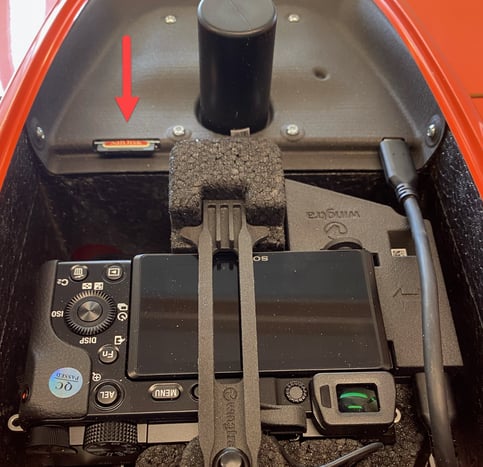
The WingtraOne GEN II SD card needs to be plugged into the SD card slot located on the e-cover. Make sure that the SD card is inserted into the WingtraOne.
WingtraOne SD Card: Internal malfunction
Occasionally, the on-board computer may malfunction during operation involving the WingtraOne SD card. Please repower the drone to resolve the problem.
WingtraOne SD Card: SD card failure
- Make sure that you are using the standard SD card provided by Wingtra or an SD card with the required specifications. Different SD cards may lead to problems with the access and writing speed, resulting in missing data. Do not use Wingtra SD cards for alternative uses.
- The SD card needs to be reformatted. Learn how to format the WingtraOne SD cards. The SD card needs to be formatted with the exFAT file system. For the WingtraOne SD card, we recommend using the tablet or the computer to format the SD card.
WingtraOne SD Card: SD card failure - read-only protection
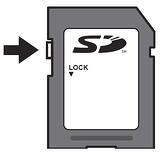
Check that the SD card adapter is not locked (a small slider on the adapter needs to be on top).
WingtraOne SD Card: Full SD card
The on-board computer detected that the WingtraOne SD card is low on free space, and thus there is an increased risk that important project data will not be stored correctly. Please free up some space.
Required specifications
The WingtraOne GEN II requires an SDXC card. You can find the full specifications in the WingtraOne SD cards article.