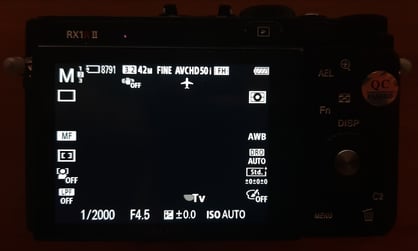
If there is a problem with the images go through these 2 questions and then gather the requested information at the bottom.
Q: The images are over or underexposed
- Check whether you are using the correct settings for the memory recall function (mode 2), see RX1 chapter.
- Check that the EV correction dial is set to +-0 EV.
Q: The images look blurry
-
If you experience blurry images, check out the following instructions on how to verify the focus settings.
- Take the camera out of the WingtraOne mount (unplug the hot shoe connector, dummy battery and triggering cable first)
- Insert the camera battery you received together with your unit (in the pilot box)
- Make sure you have an SD card inserted into RX1R II
- Check the camera settings (see RX1 chapter)
- Focus mode: manual
- Aperture: 4.5
- Rough focus ring: 0.3m-infinity
- Take some pictures. Take the SD card out and visually inspect the images on a computer
- If you are unsure about image sharpness, send a picture to support@wingtra.com
Information to provide support
If you did not find a solution to your image quality problem in the list above, please gather the following information and contact support, so that we have all the information needed to address your issue: Open ticket.
Problem description
Describe the problem you are having in free text.
Image
Please send us the original picture file where you encounter bad quality. The file stores Exif data, which contains information useful to find out what the problem might be.
Image settings
The camera settings are visible on the camera screen when in camera. Please send us a picture of this mode.
- Some parts may be flashing, so try if you can capture them too
- Setting the brightness of your capturing device to low helps to better see the letters on the screen