This internal article for WingtraNauts serves to outline how to handle interactions with propeller customers and how to find resources to learn how to use the software for demonstrations and support.
Overview
Designed specifically for the construction and earthworks industry, the Propeller Platform and WingtraOne drone partnership make it easy for construction professionals to collect survey-grade data across their entire worksite, consistently and accurately. What used to take days or weeks, can now be completed in hours, with more accuracy and reliability.
To operate, Surveyors place Propeller AeroPoints™ (smart ground control points) on their worksite, then fly the WingtraOne drone to collect worksite survey data. Survey images are uploaded to Propeller’s cloud-based platform where the fully automated geotagging and photogrammetry processing is completed within 24 hours of submission on the platform.
WingtraOne data collection with AeroPoints™️ and Propeller PPK reduces risk and improves efficiency by serving as a reliable, single source for survey data and progress. Unlike traditional survey methods, which require manual, error-prone data collection, surveyors can easily fly their site on a regular basis to collect and process survey data.
Teams across the entire worksite can view geographically accurate, realistic 3D site models and track, inspect, and report on job progress and productivity. This increased accuracy and reliability has been shown to reduce conflict, more quickly resolve disputes, and drive more pre-construction bid precision.
Wingtra Accounts
Wingtra has a Propeller account for processing practice or demo data. Propeller Aero runs on a token-based subscription plan so you use credits to process datasets. Here is a link for more information on pricing and propeller plans.
For data processing, use the shared account so that billing/credits are all used under the business account for Wingtra.
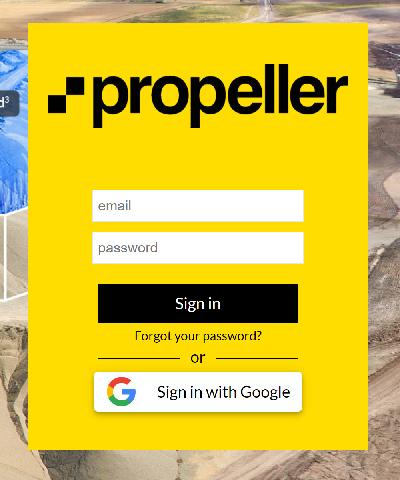
Wingtra Login Portal takes you to the portal or you can access it via their homepage and then by logging in to the top right button.
Username: shopping@wingtra.com
Password: Go******* (See Handbook)
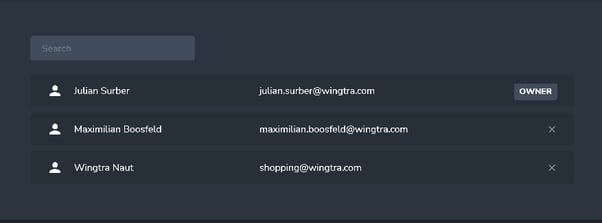
There are 3 administrators listed under the Wingtra account. If you need more credits to process data please notify Julian or Max.
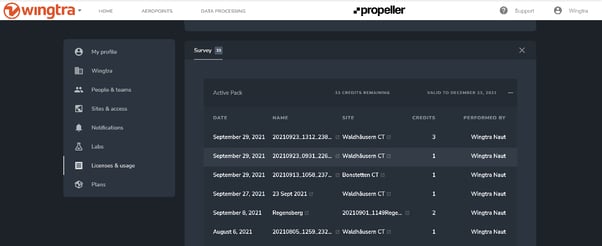
Under the licenses and usage tab in the settings, you can see how many credits are available and information about the account. If you wish to use the PPK geotagging feature in Propeller, you need to have an active license. The Propeller PPK solution requires an annual subscription payment of USD $2,000.
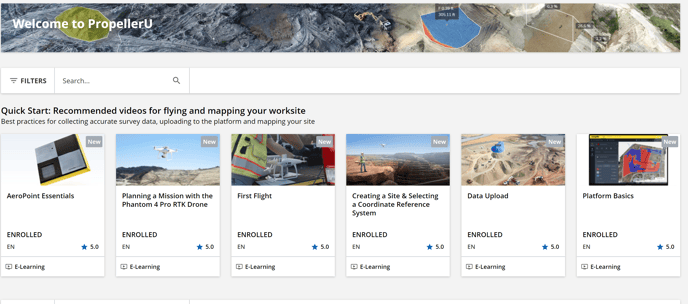
For training purposes, it is suggested that each individual uses their personal email to register for access to the propeller KnowledgeBase. Under our account, click 'add people' then you can use your work email to gain access to their login pages. Read through their quickstart guide and enroll in the PropellerU online training platform. You can also access the PropellerU platform through the portal support link at the top right of the page. Once you are logged in using your propeller credentials you have access to all their e-learning tools.
For further training information contact: <learn@propelleraero.com.au>
Wingtra owns 2 sets of Aeropoints V2s which can act as base stations for PPK Geotagging. One set is located in the US and the other in Zurich. There are 2 versions of the Aeropoints.
You must have Aeropoint V2s if you wish to use one as a base station. On purchasing an AeroPoint, if you buy a drone from another source (not in a Propeller PPK Bundle), you must pay a $2,000 PPK upgrade fee, which includes an $800 AeroPoint and access to PPK processing. If you buy a PPK Bundle from our dealers, this is included.
The minimum requirements to run the cloud-based SW are:
Use Google Chrome.
- This is the only supported web browser.
- Visit WebGL's website to check if your browser supports WebGL. WebGL is the engine that allows us to run 3D visualizations in your browser.
- The reason we can do powerful tasks on normal computers is through cloud computing and storage, over the internet. Without a stable internet connection, there's no way for you to be able to connect to these services. Upload and download speeds can vary depending on the size of your data. For optimal performance, we recommend speeds greater than 10 mbps.
Support
Who should you go to with questions about using your WingtraOne drone with Propeller?
Propeller has outlined a nice flow guide on whom to contact for help. This support model will ensure customers are steered in the correct direction for assistance.
WingtraOne Support with Propeller.
- For an overview on all things Propeller and guides for using their product visit the Propeller Knowledge Base and Help Center.
- For general AeroPoint issues, please contact the Propeller hardware support team by emailing hardwaresupport@propelleraero.com.au.
- For WingtraOne questions, please contact Wingtra Support at <support@wingtra.com>
- For internal communications and organization here are the people to contact for Wingtra/Propeller relations.
Wingtra Key Personnel:
Product Owner: Julian Surber: <julian.surber@wingtra.com>
Support Owner: Jack Wilcox: <jack.wilcox@wingtra.com>
Support Owner backup: Spencer Niebuhr: <spencer.niebuhr@wingtra.com>
Dev Team Owner: Andreas Bircher: <andreas@wingtra.com>
Propeller Key Personnel:
Sales Owner: Richard Hordern-Gibbings: <richard@propelleraero.com.au>
Customer Success Owner: Jack Nachazel: <jack.nachazel@propelleraero.com.au>
Dev Team Owner: Martin Le: <martin@propelleraero.com.au>
We have ongoing meetings with Propeller every 6 weeks to synch on changes and support cases. The meeting summary document can be found here.
If a customer reaches out with a Wingtra/Propeller issue the first step is to look at the support model to determine who is responsible for taking care of the issue.
- Create a ticket under the company propeller if they contact us via email. If the customer reaches out directly to Wingtra notify the customer success leads to so they can establish clear responsibility on which party is communicating with the customer and assign available CS.
- Get in the habit of sharing datasets with Propeller to prevent the customer from uploading 2x to each support team.
- Try to escalate to lead dev owners quickly after collecting datasets. Ticket owner engineering is Andi.
- Make sure in ticket classification that propeller SW is marked correctly for reporting.
Prepare for a Wingtra/Propeller demo
1.) Synch will the propeller sales rep so they can notify their processing team in advance that there is a pre-sales opportunity so that they can offer assistance and prepare. If you are unsure, create a support engineering ticket with Wingtra to assist in preparing for the demonstration.
2.) Make sure the Wingtra drone is registered and the PPK License is activated not only with Wingtra but also with Propeller. Make sure the Aeropoints are activated and linked to the portal account for upload. Download the Propeller mobile application on your phone.
Checklist:
- Wingtra Gen2 PPK License Activated
- Gen2 Registered with Wingtra
- Propeller Portal is setup with credits and an account is created
- Wingtra is registered in Propeller
- Aeropoints are activated and registered
- Active Propeller PPK subscription (Unless using WingtraHub)
3.) Plan on which base station you will be using and which SW will run the geotagging as this will determine the workflow path. Always try to plan the coordinate systems in advance and if local coordinates are used you’ll need the calibration files and use AeroStencils to place the pads precisely over known points.
Checklist:
- Geotagging in Propeller or WingtraHub?
- Coordinate system: Published or Local?
- Base station: Aeropoint V2, Local Base, CORS?
4.) Reference the following KnowledgeBase Articles
- Wingtra - Propeller Processing Guide
- Registering WingtraOne
- Uploading a PPK Survey Dataset
- Using Propeller PPK with WingtraOne