- Help Center
- Troubleshooting
- Advanced Troubleshooting
Importing Flight Data Into DroneLogBook
For users who want basic information about their flights to store in a log management system, this article shows how to import the .json file from the mission.
This workflow does not use the WingtraPilotLogs which are currently incompatible with 3rd party management systems.
1.) After a flight locate the WingtraPilotProjects folder.
2.) In the DATA folder, there is a .json file that contains some information related to the position and time of the flight.

3.) Create an account or log in to DroneLogBook then navigate to the Flights tab.

4.) Click on Add Flight. Importing Flight. From Log File.
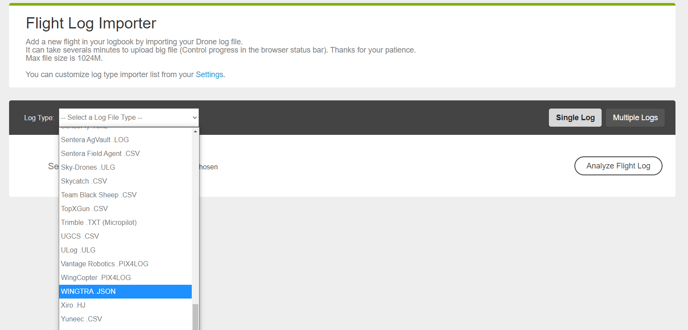
5.) Next to Log Type scroll down until you find Wingtra .json. Locate the file path of the .json file after selecting Choose File, and then click Analyze Flight.
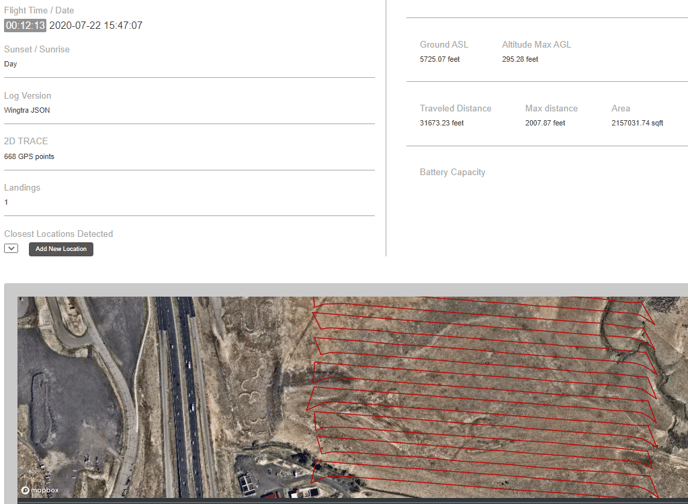
6.) You can now store and view some basic information from the flight such as date, time, distance, area, height, location, and landings.