This article explains how split payments are reflected in Hubspot.
Typically, only once the deal is closed the payment terms are defined and committed to. Although we have standard terms of upfront payment (and we generally push for that), there may be cases we agree to split payments/ payment by installments.
We have upfront payment terms as a standard!
If Wingtra agrees payments by installments, i.e. 50% upfront and 50% 30d after delivery we need to reflect that properly in Hubspot. Every payment requires it's own deal and an invoice. If you have several tranches paid you need to reflect each in a separate deal. Typically, one payment is split into 2 parts which requires 2 deals. The properties of the first/primary deal and the corresponding secondary deal are described below.
The primary deal
The primary deal is where the whole deal-making is happening:
- Tracking of all communication
- Issue of quote
- Assignment of contacts and company
- Shipment goes from the primary deal
- etc.
Naming
Give it a clear name so it is clear that it is the first X% of the payment.
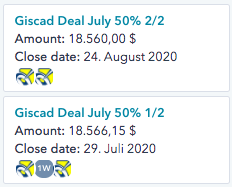
Properties
Besides the required fields upon deal creation, these properties must be filled:
- Type of order
- # of drones
- Payment terms
- Payment due date
- Amount: add manually
Quote
The quote reflects the deal. The quote shall be signed. Alternatively, we receive a PO that should be saved on the primary deal.
Read how to create quotes here.
Invoice
Every payment requires an invoice. For split payments, the terms can be defined in 1 invoice or every split can get its own invoice.
Read about our automated payment reminders here.
Shipment
The shipment is created from this deal.
Read about how to create a shipment and what the different types mean here.
The secondary deal
The secondary deal must reflect the rest of the payment that is expected.
- Type of order = same as primary
- # of drones = 0
- Payment terms = What are the terms of the second split
- Payment due date = when is the second split due
- Amount: add manually
The secondary deal does not have a quote or shipment linked.
Please note that the "# of drones" must be = 0
Please cross-reference the deals by adding a pinned note on the record of each deal and referencing to the other one.