- Help Center
- Wingtra Internal
- Customer Success
How to retrieve the electronic serial number from the flight logs?
This article describes how to retrieve the electronic serial number, of drone parts, from the flight logs.
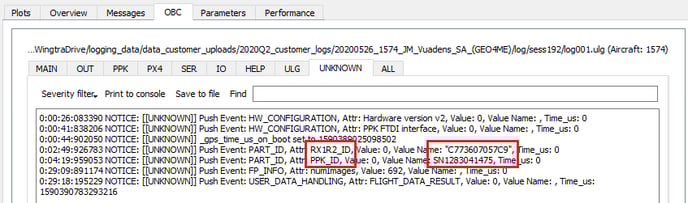
Find the electronic serial number for a Sony RX1RII camera and a PPK module, using the WingtraExplorer:
- Use WingtraExplorer to navigate to a flight log session.
- Click on the OBC tab followed by the UNKNOWN tab.
- Search for the keyword "PART_ID".
- By looking at the "Attr" and "Value name", you can see the name of a drone part and serial number:
To quickly check a camera electronic serial number using text editor:
1. Navigate to a flight log session:

2. Open the "cronlog" file in a text viewer/editor and search for the keyword "serialnumber". The SerialNumber you are looking for is below the Product and Manufacturer row, like on the image below:
