Learn how many GCPs and how many checkpoints you should have if you process WingtraOne data on the Propeller platform.
What is the difference between ground control points (GCPs) for processing and checkpoints for control?
Ground control points are ground targets that are registered and used for the generation of your orthophoto or 3D model by the photogrammetry algorithms. Ground targets cannot be simultaneously used as both ground control and as a checkpoints for validation.
Checkpoints are ground targets that are NOT used for the generation of your orthophoto or 3D models by the photogrammetry algorithms. They are only used AFTERWARDS to validate the accuracy of your outputs by comparing their position against the processed model.
Recommended number of GCPs
Propeller requires customers using the Propeller PPK workflow to use at least one AeroPoint as GCP which provides validation when processing in local or custom coordinate systems. This AeroPoint saves users an additional step in WingtraHub, and images can be dragged and dropped directly from the drone into the Propeller uploader. For survey-grade absolute accuracy, an AeroPoint version 2 is required.
As an alternative, customers can continue to use the WingtraHub workflow if they’re familiar with it. In this case, they will need either a local base station or data from a nearby CORS station providing L1 and L2 data. This workflow is NOT suited for local or custom coordinate systems. The WingtraHub workflow requires no ground control points. Customers should note that datasets collected using this method can be more difficult for Propeller’s data team to troubleshoot.
Recommended number of checkpoints
Validating the accuracy of outputs is recommended as best practice for professional use.
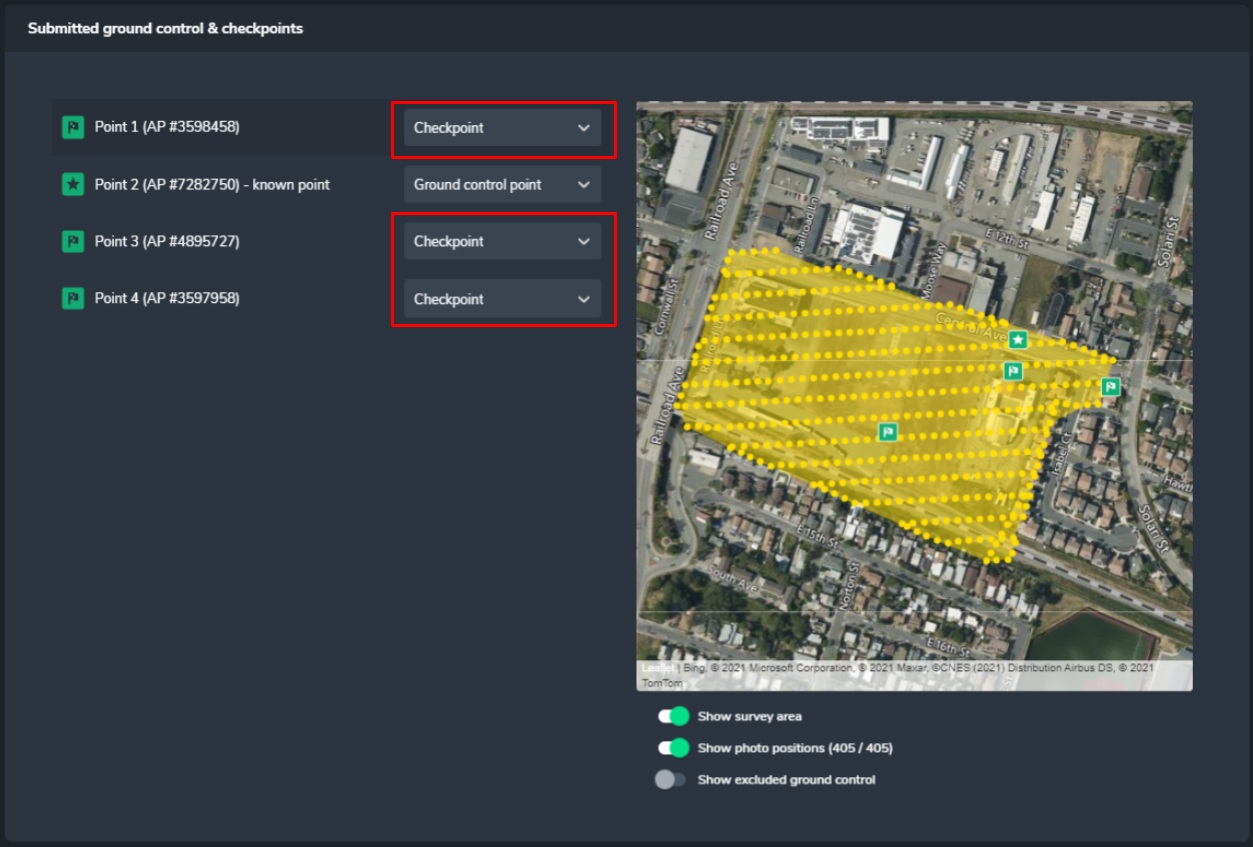
Any validation is better than none, but as best practice we recommend using 2-4 checkpoints per project IN ADDITION to any ground control points. These checkpoints can be either AeroPoints or conventional ground targets with known coordinates.
It is CRITICAL that these ground targets are not being used in the processing step and are set to checkpoints (see screenshot).
Conclusion:
How many AeroPoints are optimal?
- We recommend to lay out 3-5 AeroPoints (version 2) if you operate a WingtraOne PPK drone
- Place one out of the 3-5 AeroPoints on a known point—you will use this point to geotag the images
- Use the other 2-4 AeroPoints as checkpoints to prove the accuracy of your dataset
What if I want to use more GCPs?
- You are free to use more GCPs; however, we recommend you to do your own testing to see how much time you can save
- Start with a higher number of GCPs—for example 5 or 10
- Process your project and assess the accuracy
- Now, process your project again, but reduce the number of GCPs and set them to be used as checkpoints this time
- Check the accuracy again and compare it to the accuracy you obtained with the higher number of GCPs
- For example, start with 10 GCPs, then reprocess the dataset with 5 GCPs and 5 checkpoints, then move down to 1 GCP and 9 checkpoints
- Note that a low number of GCPs (2-3) usually results in worse accuracy than 1 or no GCP