Instructions to modify the magnetometer failsafe trigger values if given permission from the support team to change.
Caution:
- Deviating from the described procedure may cause a fatal system failure
- Use this support doc only when you are given permission from Wingtra Support
- Please take verification screenshots of settings to send to support once complete
Required Equipment:
- WingtraOne sitting upright
- A pair of charged batteries
- Tablet (with WingtraPilot version 1.14 or above)
- Telemetry Connection
Step by step procedure
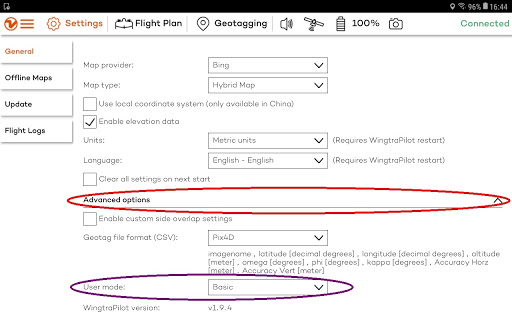
- Go to the “General” tab under “Settings”, click and open up “Advanced options” (red circle). Change “User mode” from “Basic” to “Wingtra” (purple circle). The password is wingtra.1. Make sure to change back to Basic mode before starting a flight.
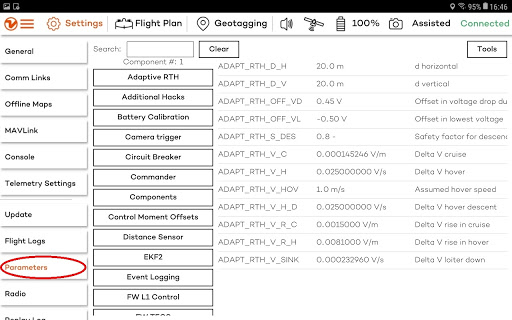
- On the left column, go to “Parameters” (red circle).
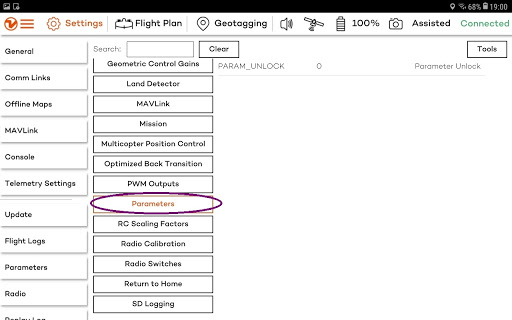
- On the next column, scroll down until you find “Parameters” (purple circle) and select it.
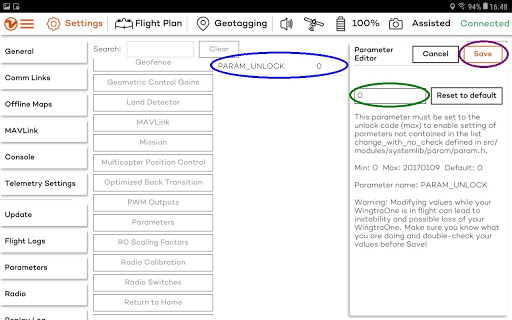
- Select “PARAM_UNLOCK” (blue circle). There will be a parameter changing interface popping up on the right. Change the parameter value from 0 to 20170109 (green circle), and then save it (purple circle).
- On the top right, press “Tools” (red circle) and then press “Refresh” (green circle).
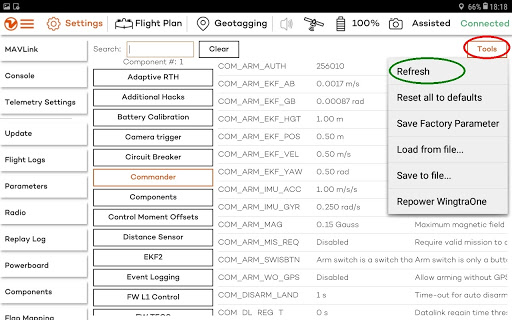
- Search for the following parameters to change:
1.) EKF2_HEAD_NOISE = 1.0
2.) EKF2_MAG_NOISE = 1.0
3.) EKF2_HDG_GATE = 1.0
- On the second left column, scroll down until you find “System” (purple circle) and select it.
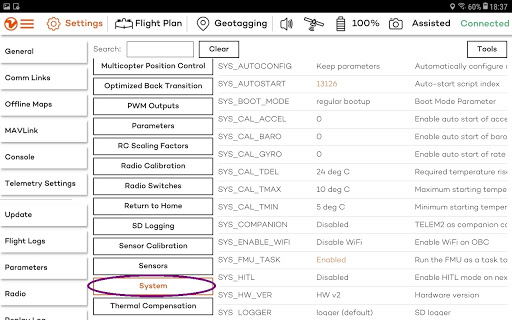
- Scroll down the parameters and select “SYS_STABLE_PARAM” (blue circle). There will be a parameter changing interface popping up on the right. Change the parameter value from “Reset parameters to default values …” to “Keep current parameters at the boot” (green circle), and then save it (purple circle).
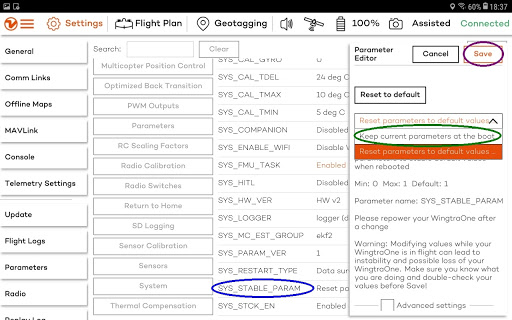
- Repower WingtraOne and restart WingtraPilot to reset the User mode to “Basic”.
- Go back into "Advanced mode" by entering the password then take a screenshot of the parameter settings to show they saved and everything was done correctly
- Screenshot:
- EKF2_HEAD_NOISE = 1.0
- EKF2_MAG_NOISE = 1.0
- EKF2_HDG_GATE = 1.0
- "Keep current parameters at boot"
- After the first flight in the area with magnetic interference please upload logs to support for analysis and improvement purposes