- Help Center
- Wingtra Internal
- Known issues
Known issue: Antenna offset in WingtraHub is unclear
What to enter in the WingtraHub Base Station editor field "Antenna offset"? Why do I have a constant vertical offset?
Check out the attached image for illustration.
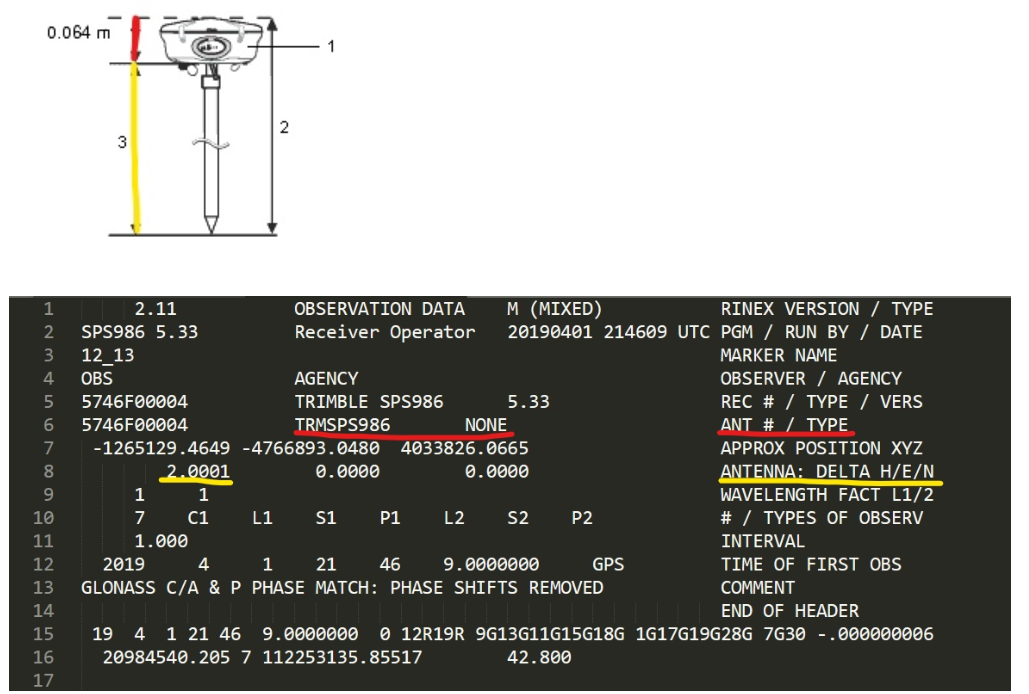
Enter the coordinates of the bottom of the antenna in the WingtraHub base station editor. The antenna phase center offset (distance between antenna phase center and antenna reference point) is automatically added based on the antenna type provided in the RINEX file (red).
If the antenna type is not provided in the RINEX, you will get a warning during WingtraHub processing. In this case the offset needs to be added manually. For a list of known antenna types please refer to the
antenna type article.
Currently, the pole height (Antenna delta H, marked yellow) is not automatically included in the processing. You need to specify it in WingtraHub. If the antenna type was not detected you need to add them together.
The vertical offset needs to be specified in th
e field antenna offset up. Antenna offset east and west are only used if the antenna is not placed centered on the known coordinates. Usually it is not required since the antenna is centered over the known point.
