In some cases, CSM can suggest additional training (refresher) to a reseller or an end-user. What is additional training, and how to do one, read in the article below.
Additional training (refresher) is only related to existing distributors and end-users, already onboarded. Do not mix them with onboarding training which goes through Clickup.
This type of training is free for resellers and direct sales. If end-users are interested please approach Andrea as it might be sold as consultancy.
The objective of Additional training tickets is to have a written record of refresher training done by Wingtra Support. As most of our revenue comes through distributors, our goal is to keep them trained well and up to date with new features so they can perform successful demos and sell more WingtraOnes. There are no straight forward conditions when the training should be done - it is fully up to CSM and his judgment. If you notice refreshers could be helpful, suggest that option to the reseller/customer during periodic call or in ticket conversation, there are no frequency restrictions about this kind of training - it should be done in case the issues are detected.
There is no restriction on the length of these types of training - in case you decide to touch just a specific topic (e.g. geotagging in WingtraHub) it can take one hour, but if you need to train the new group of employees it can take up to one working day.
Here are some examples when to propose the additional training session:
- To make customers/resellers more familiar with new features,
- A reseller have new employees who have not trained adequately or are not trained at all,
- CS staff notice through communication (tickets, calls) lack of knowledge of WingtraOne system
All trainings of that kind should go through tickets in HubSpot and be placed into the Training pipeline. They can be created by the sales or support side. Check below what are the stages and what metadata should be filled.

Each ticket goes through stages, which are:
- New - ticket created by support or sales side
- Arranging – communication has started, agreeing on dates and agenda, when done move to the next stage. When picking dates contact Zoran for date confirmation.
- Confirmed and scheduled training – all agreed, training arranged and confirmed
- Training in progress - training is ongoing
- Training done– training is done, send follow up email and close the ticket
All tickets in the training pipeline have specific attributes that need to be populated. Those are:
Left side tab
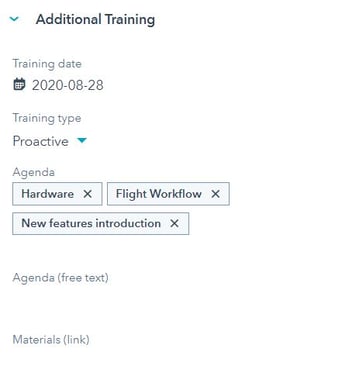
- Ticket main category - additional training
- Training date – put a date when agreed the training is going to happen
- Training type
- Proactive - use this category for train the user about the new features, training new staff, etc
- Reactive - use this category if the purpose of the training is incident or an issue happened in the past, caused due lack of knowledge of the user
- Agenda – select topics included in training
- Hardware
- Repairs
- WingtraHub software (geotagging)
- WingraPilot app (flight planning)
- Flight Workflow
- Processing Workflow (Pix4D)
- Web Applications (Distributor Dashboard, Knowledge Base, Feedback Portal)
- New features introduction
- Tips&Tricks
- Presentation for them to train end customers
- Presentation for them to sell to specific fields (mining, agriculture, surveying, etc)
- Something else
- Agenda (free text) – add an additional explanation if needed
- Materials (link)
- create subfolder YYYYMMDD_ADDITIONAL TRAINING_RESELLER/USER NAME
- link materials used for training (slides, videos, video of training, etc).
Right side tab
- Company - link the company
- Contacts - link attendees