In this article, you can find steps on how to add or update drone properties.
In the Hubspot database, we save all of the drones as contacts. To search for certain drone navigate to the Contacts tab in Hubspot and search for a drone by entering the drone ID.
To list the drones with specific properties use a predefined filter:
Click on the drone to access its records in the Hubspot.
Scroll down to the left sidebar of the page to the Wingtra Inventory App section.
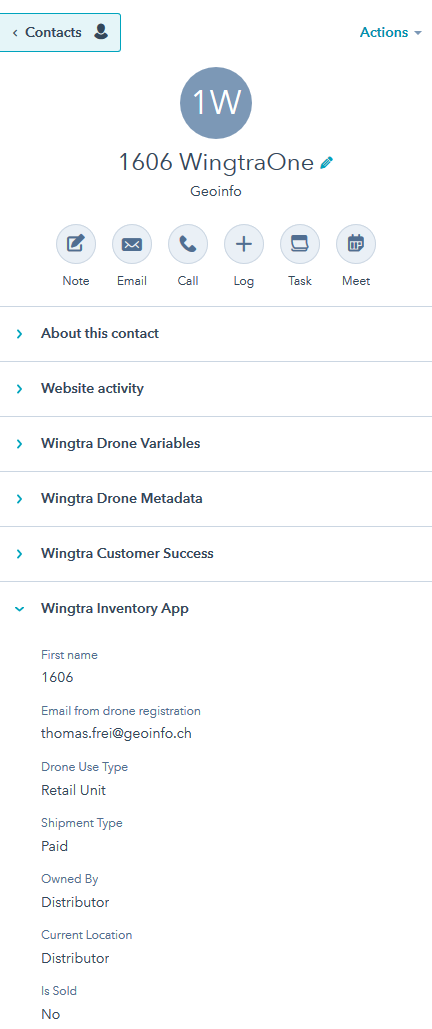
You can change the properties of the drone according to the drone current status.
(changing a property in the HubSpot will reflect the properties in Inventory App and it also works the other way around)
Name - identification number of a drone.
This property is automatically set once a new drone is added to the records.
Customer Email (email from drone registration) - Email address of the customer/owner of the drone.
This property will be populated by a registration form submitted by the customer, or by the distributor using the report a sale app. The property can also be updated manually by the CSM or sales manager.
Drone Use Type - a property that defines the original use type of a drone.
- Retail unit
- Demo unit
- Rental unit
- WID Unit
- Other
This property is automatically set once the shipment is sent. Later on, it can be edited if needed.
Shipment Type - a property that defines the original shipment type of a drone.
- Paid
- Replacement (under warranty)
- Replacement (paid)
- Internal use Wingtra
- New/ additional WID
This property is automatically set once the shipment is sent. Later on, it can be edited if needed.
Owned By - a property that defines who is the owner of a drone.
- Wingtra
- Distributor
- End-User
This property is automatically set once the shipment is sent. Later on, it can be edited if needed.
*Current Location - a property that defines the current location of a drone.
- Wingtra
- Distributor
- End User
- In Transit
This property is automatically set once the shipment is sent. Later on, it can be edited if needed.
This property can be edited by the distributors.
*Is Sold or Owned by Enduser? - a property that defines is the drone sold.
*This property is set once a shipment is sent. Later on, it can be edited if needed.
- Yes
- No
This property is automatically set once the shipment is sent and when the report a sale is reported trough the report a sale app. Later on, it can be edited if needed.
This property can be edited by the distributors.
Original Shipment Product Code - an original payload of the drone.
This property is automatically set once the shipment is sent.
Shipment Type:
Paid Paid - P
Replacement (paid) Replacement (paid) - RP
Replacement (under warranty) Replacement (under warranty) - RW
Internal use Wingtra Internal use Wingtra - IW
New /additional WID Wingtra Inventory at Distributor - W
Free material (free demo units, gifts) Free material (free demo units, gifts) - FM
Drone Use Type:
Demo Unit Demo Unit - D
Retail Unit Retail Unit - RT
WID Unit Wingtra Inventory at Distributor - W
Rental Unit Rental Unit - RE
Discount on List Price:
Paid Standard Discount Paid Standard Discount - PS
Paid Demo Discount Paid Demo Discount - PD
Paid Edu Discount Paid Edu Discount - PE
Paid Other Discount Paid Other Discount - PO
Internal Use Wingtra Internal Use Wingtra - IW
WID not paid Wingtra Inventory at Distributor - W
Free under warranty Free under warranty - F
Other Other
*Current Payload - current payload of a drone.
- Sony RX1 R2
- Sony QX1
- Red Edge
- PPK module
- Empty (wing only)
Currently only manual updates.
This property can be edited by the distributors.
Needs software update - a property that defines if the drone’s software version is up to date.
- No
- Yes
- Not applicable
- Unknown
Automated record, based on the latest software release and the metadata.
Drone Status - current status of a drone.
- Fit for Use
- Returned to Wingtra
- Damaged (not usable)
- In Repair
- Decommissioned
- Replaced and decommissioned
- Replaced and returned to Wingtra
This property is automatically set once the shipment is sent. Later on, it can be edited if needed.
Discount on List Price - a property that shows the original discount.
- Paid Standard Discount
- Paid Demo Discount
- Paid Edu Discount
- Paid Other Discount
- Internal use Wingtra
- Wingtra Inventory at Distributor
This property is automatically set once the shipment is sent.
Drone Original Shipment ID - the original shipment identification number.
This property is automatically set once the shipment is sent.
Drone Original Shipment: Reseller Deal Reference Number - the original drone Reseller Deal Reference Number
This property is automatically set once the shipment is sent.
*Drone Notes from Distributor - notes about a drone from the distributor
- Free text - any comment that might be important for this drone
Drone Notes from Wingtra - notes about the drone from Wingtra
- Free text - any comment that might be important for this drone
Once done with editing don't forget to press the save button.