Instructions how to check the health of the flight batteries in WingtraPilot and the flight logs.
Instructions for customers are provided in the public KB article Battery Health Check. This article contains more in depth insights about how to analyze battery health and how to treat customers.
WingtraPilot display
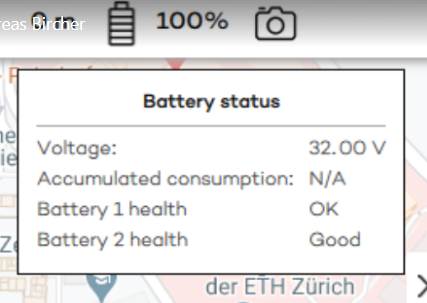
- From SW version 1.13 health is displayed in drop-down below the battery symbol
- Good = >85%
- Warning = <85% (also pop-up at end of flight)
- Critical = <80% (PREVENTS TAKE-OFF, also pop up displaying actual number)
Log Analysis
- 1 log file for every repowering cycle, allowing readout of 1 battery each (or 2 batteries each on V3)
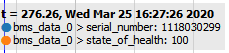
- Relevant values to read out using WingtraExplorer
- Topic: bms_data_0 (and bms_data_1 on V3s)
- serial_number and state_of_health (use marker line to show actual value)
Customer communication
Batteries are officially not covered under warranty. In some situations, we nevertheless replace the batteries as Wingtra goodwill to ensure customer happiness.
Free replacement
- Physical damage due to a production issue within the first year (e.g. broken battery cable)
- If customer is out of warranty but is really unhappy about the product quality, you can offer discount or offer batteries for free
- Damages due to crash caused by technical failure covered under warranty
- Damaged battery cells despite proper usage within first year
- Low health status after few flights (< 100) within first few months (<6)
- Active Total Maintenance Plan
Paid replacement
- Damages due to user fault or out of warranty crash
- Improper usage (e.g. deep discharge of batteries)
- Low health status after normal usage